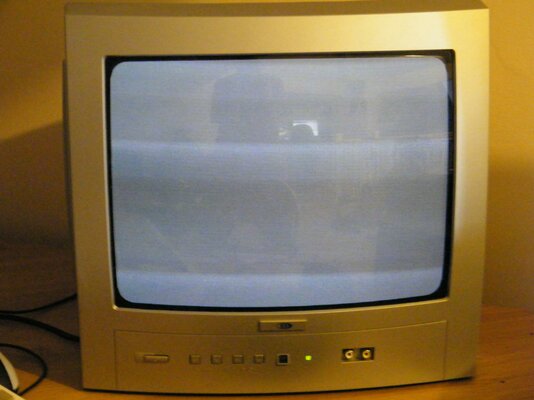
A1200 no picture...

  • Thread starter Thread starter AmiNeo
  • Start date Start date
  • Replies Replies 142
  • Views Views 17973
a1200 roms are totally different than a600.

a600 is single rom.
a1200 is dual roms. not 2 of same rom, 2 make a whole.

Also, make sure they are installed the correct way around.
 
Amineo, the 1200 roms will not work in the 600 and the 600 roms wont work in the 1200.
I also have a fully working set of 3.0 roms i can gift you if zeets is unable to produce the goods :lol: (very unlikely i know).

Mike
 
lol well if the ROMS were the problem id have expected the red screen to signify that but as the 600 gives the same output when its ROM is wrong... its got me wondering if it could be the ROM.
 
i have an rgb (23 pin video port) to scart cable that i have no use for as it has no audio on it if you want it i can send it you for the cost of postage.
Its a little worse for wear but it works with my 1200.
At least it will allow you to test the video port
 
@AmiNeo

A red screen is not nessasary a BAD rom - infact in the A1200 a BAD rom is normally a black screen.

A red screen is usually reserved for problems with devices that fail auto config / initilization state - like accelerators / adapters - zorro cards etc.

Its important to understand the A1200 is a completely different beast of a machine than that of the A600

For one the A600 is 16bit and the A1200 is 32bit, now this translates to how it deals and processes its data - as such it uses 2x 16bit ROM's as 32bit words (i.e. each data fetch is 32bits) - On the A600 its data fetch is 16 bits - the only exception to this is the CD32.

Its important to note that the ROM(s) in the A1200 is right aligned - thats to say that with the rear ports at the back the rom must be placed furthest right in the socket.

have a close look at this picture

Its imperative that the ROMs are align in such a fashion or they will be destroyed - if this happens even for a second, then you will need to replace the ROMs.

 
Heres a pic of the output im getting...

This is on both composite and RF and the lines flicker as if the screen is rolling...
 

Attachments

  • DSCF3939.jpg
    DSCF3939.jpg
    185.8 KB · Views: 3
@AmiNeo

A red screen is not nessasary a BAD rom - infact in the A1200 a BAD rom is normally a black screen.

A red screen is usually reserved for problems with devices that fail auto config / initilization state - like accelerators / adapters - zorro cards etc.

Its important to understand the A1200 is a completely different beast of a machine than that of the A600

For one the A600 is 16bit and the A1200 is 32bit, now this translates to how it deals and processes its data - as such it uses 2x 16bit ROM's as 32bit words (i.e. each data fetch is 32bits) - On the A600 its data fetch is 16 bits - the only exception to this is the CD32.

Its important to note that the ROM(s) in the A1200 is right aligned - thats to say that with the rear ports at the back the rom must be placed furthest right in the socket.

have a close look at this picture

Its imperative that the ROMs are align in such a fashion or they will be destroyed - if this happens even for a second, then you will need to replace the ROMs.

Ok i assumed that amiga may have just gone with the same codes throughout the family.

As for the ROMs seating, thats how they are, check my pics on the first page :)
 
Amineo as above if you can cover the cost of postage i can send you a scart cable that will plug directly into the 23 pin video port (on any amiga model) and the other end into a scart socket on a tv.
I can also send some known working 3.0 roms in the package if you want them.

Mike
 
If you guys are offering free stuff to test it out i would gladly accept.

I have to say this really is the most awesome place on the interwebs :lol:
 
=D

hit me up with your postage deet on PM AmiNeo
 
well the roms i'm offering are the same as zetr0 is offering but there's no point us both sending you the same thing so if Z doesnt mind i'll send you the roms along with the scart cable.
 
@scrappy

there you go - job done and sorted =)

Scrappy for the win! =D
 
@Thanks Z, no point him paying out postage for 2 of the same thing lol

@Amineo i'll get them posted tomorrow as i have your address from the 600 motherboard and due to the low cost (shouldnt be a lot for a cable and roms) i'll even cover the postage for you.

Mike
 
sweet crappy, cheers, i owe you one!

:thumbsup:
 
It shouldnt matter which of the 3.0 roms are ontop right? I wonder if maybe 1 of them works and teh other doesnt, cos when i swap them around (put the top one in the bottom socket and the bottom one in the top socket) the screen stops doing that rolling thing and just remains black.

---------- Post added at 21:25 ---------- Previous post was at 21:25 ----------

Damn keyboard! ROFL sorry bud! :lol:
 
i believe but i'm not positive they have to be in a certain orientation

They have to be seated at the far right and with the higher numbered one (391524-01) at in the top socket and the lower numbered (391523-01) in the bottom socket.
 
ah then that may explain the difference... I take it they were only ever released as sets then? Well i suppose originally they were never intended for use outside the factory...
 
Back
Top Bottom