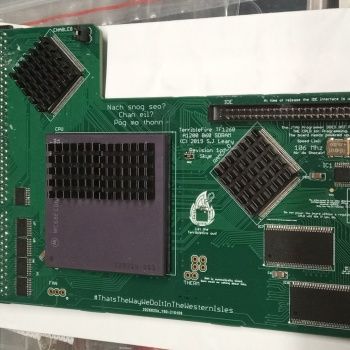
A1200 TF1260 Build

  • Thread starter Thread starter fitzsteve
  • Start date Start date
  • Replies Replies 90
  • Views Views 7397
I got one of these blowers: https://www.amazon.com/gp/product/B08R9JW1DF/

It's perfect.. I'm running it off of 5V to keep it from being too loud. I have it set near the top left of the expansion slot under the keyboard, blowing air over the card (towards the lower-right corner of the A1200). Coupled with heatsinks, everything stays cool to the touch at 63 MHz.

as an aside about screenmodes, I've tried both the indivision and an OSSC but didn't quite like them (using them with CRTs). The OSSC doesn't have a flickerfixer, and I wasn't that happy with the indivision. I'm lucky to have a 1942 and just use that, and a hacked Super72 800x600 @ 83 Hz works great for IBrowse etc when I need more real estate with minimal flicker. Otherwise, Multiscan for everything is great for a 14" CRT. :)
 
Last edited:
How come nobody ever made a P96 driver for the IndiECS?

It's not an RTG card so I don't think that would be possible, I know there is a native P96 driver but I haven't tried it.
 
I'm using the native driver, which gives back a reasonable chunk of chip RAM, and makes redraw times a bit snappier. Do you know if the Indi Mk2 Cr can display the 800x600 mode Steve?

Cheers,

AndyC

- - - Updated - - -

HI there - have you fixed it to the underside of the keyboard? Or is it a bit more Heath Robinson than that? ;-)
 
HI there - have you fixed it to the underside of the keyboard? Or is it a bit more Heath Robinson than that? ;-)

If you are talking about the blower fan, then this seems to be the optimum placement....just a little bit of hot glue needed :)

View attachment 1472347
Original picture taken by Trixster
 
Aah, alas I have some other hardware getting in the way there... I'll see what I can come up with :-)
 
Have any of you tried the PCMIA slot?

I was thinking of using it to transfer files but it seems to hang my system.

Not a biggy as I've got external access to the CF on the 1260 so I can use that for transferring stuff back and forth.
 
Last edited:
Have any of you tried the PCMIA slot?

I was thinking of using it to transfer files but it seems to hang my system.

Not a biggy as I've got external access to the CF on the 1260 so I can use that for transferring stuff back and forth.

Works fine for me, I always use the PCMCIA slot for file transfer. TF1260 “release” firmware, OS 3.2.
 
I'm 3.1 on the 1200.

3.2 on the 4000D

I'll look into things - possibly even softkicking 3.2 :)
 
Do you know if the Indi Mk2 Cr can display the 800x600 mode Steve?

AFAIK it's the same card as so should do if you flash the original FW however it's touch and go if the output will work on your screen it was pretty buggy when it first came out I'm just lucky my screen plays nice.

- - - Updated - - -

I'm 3.1 on the 1200.

3.2 on the 4000D

I'll look into things - possibly even softkicking 3.2 :)

have you done timing fixes to your board? Or it could be PCMCIA reset pug, does the Amiga resume when you pull the PCMCIA card?
 
HI there - have you fixed it to the underside of the keyboard? Or is it a bit more Heath Robinson than that? ;-)

Nope, I wanted to keep more of a gap for air flow above the blower since that's the intake for it. I used some thick double-sided adhesive pads to affix the edge of the blower (where it's "exhaust" is) to the black lip of the expansion slot. Not something I'd show off, but it works. :)


Have any of you tried the PCMIA slot?

I was thinking of using it to transfer files but it seems to hang my system.

Not a biggy as I've got external access to the CF on the 1260 so I can use that for transferring stuff back and forth.

You'll probably need to grab CardPatch from aminet, that should fix you up. I had that in 3.5, and also needed it for 3.2.
 
Last edited:
@fitzsteve and comraider

Thanks.

I'll try CardPatch first before I strip it down for the timing fixes
 
Alenppc states the following on his website

WARNING:

A1200 TIMING FIXES
If your A1200 has the E123C and E125C caps mounted on the bottom of the motherboard, you should remove them. Their presence is not necessary and will make the board unstable.

Cardpatch should work for you as comraider says, but the timing fixes should really be done too.
 
Alenppc states the following on his website

WARNING:

A1200 TIMING FIXES
If your A1200 has the E123C and E125C caps mounted on the bottom of the motherboard, you should remove them. Their presence is not necessary and will make the board unstable.

Cardpatch should work for you as comraider says, but the timing fixes should really be done too.

I saw that.

I need to remove the modulator so I guess that's my Friday sorted :D
 
I have had some TF1260 owners ask me how to put the ehide.device into a custom rom, so I have done a quick how to guide below for doing a custom 3.2 and 3.1 rom.


You will need to download Doobreys Remus and Romsplit and install it on your system, link below
http://www.doobreynet.co.uk/beta/


1. Grab your 3.2 rom file from either your OS 3.2 disk or use `transrom` to grab it from your Amiga
2 Start Romsplit ( Ver 1.29) and pick your grabbed 3.2 file and click extract, then save the extracted modules to a folder of your choice.
3. Start Remus , leave the default settings as they are, click on the `Rom Contents` tab then on the right window find and load the 3.2 modules you just saved.
4. using your mouse click and select all the modules and drag them all to the left Build window.
5. Now back to the right window and search for the ehide.device
6. Now drag the ehide.device into the left window, make sure you put it at the bottom of the Build list.( If doing a custom 3.1 rom, you must remove the Workbench.library so there is enough space for the ehide.device and put the Workbench.library into the Libs dir on the System drive otherwise it will not work).

7, Go to the top of the Remus window and in the first dropdown select `Compile`, it will say done in the Build window if successful.

8. So you now have a 512k custom rom, test it in Winuae to see it works. if yes then you are ready to process it for burning to Two eproms
9. using a program like `Epromhexxer` or cartman you need to Spilt the file into two files so `Split Word`( wordwise) will then give you two 256k files ( LO- HI ),you then need to Concatenate both files, basically this means `Double` each file so it is 512k, so select each 256k file and concatenate it to 512k.

10, you now have two 512k files,so all you need to do now is `Byteswap` each file so they can be flashed onto two eproms and used in a real Amiga.

** NOTE
This guide is for rom 3.2, if you are doing a custom 3.1 then `REMOVE` the Workbench.library from the build List, make sure that you then manually replace the Workbench.library back into Libs on the System disk otherwise it will not work

Download Workbench Library here:
http://www.amigaforever.com/classic/download/
 
HI there - have you fixed it to the underside of the keyboard? Or is it a bit more Heath Robinson than that? ;-)

If you are talking about the blower fan, then this seems to be the optimum placement....just a little bit of hot glue needed :)

View attachment 169835
Original picture taken by Trixster

I'm thinking of adding heatsinks to the CPLD's or whatever they are called :lol: they seem to get quite hot too

anyone else finding this??
 
I'm thinking of adding heatsinks to the CPLD's or whatever they are called :lol: they seem to get quite hot too

anyone else finding this??

Yes, add them to both CPLD's and the CPU mate. If you are going to overclock then they are an absolute must as it can get a bit toasty under the keyboard :flamethrower:


@supaduper

Nice custom 3.2 ROM guide, thanks! :)
 
Last edited:


Exactly how I was thinking of doing it.

@miggymad, Has your EC got an MMU? seen a few people find they have LC's in disguise or is this a full in disguise :lol: .

Got a full Rev 1 in mine was going to put a Rev 5 in it, but my Rev 1 seems to achieve the same speed has fitzsteves Rev 5 (62+1 mhz)(crashes on 75 pre-set) so don't see the point.

I also tried an LC in mine, which could achieve the 80mhz but I found if I enabled the onboard IDE then it would crash if I selected 75mhz, disable IDE fine again. Any one experienced this, is this already known?
 
Last edited:
@timteloon, cooling is the secret. Get those heatsinks on the chips and have a blower fan on the go. Sounds like your crashes at higher speeds could be heat related.

If you look at the fins on the heatsinks, there is a thin and a thick side to them. Try and keep the thin side pointing towards any fan as it should allow more airflow (the path of least resistance).

My CPU is the MC68EC060RC75 - 75G59Y mask. There is no FPU or MMU onboard but have managed to run it at the slightly overclocked rate of 80Mhz with minimal effort and it remains stable.

I've read posts on other forums going way back as far as 2007 that say it could even be pushed to 100Mhz but I am very sceptical. I do wonder if I could push it further to 85Mhz, or even perhaps to 90Mhz. That's for another time though, for now am just enjoying the hardware and all the fun it brings :)
 
Last edited:
Back
Top Bottom