A4000T not working

  • Thread starter Thread starter JHanna
  • Start date Start date
  • Replies Replies 119
  • Views Views 4139
Boom there it is

Well at least you know what the problem is.


They are eeproms so you could get them reflashed, will say the are marked as just A4K ROMs and not A4KT ROMs.

These are from 1997. Why would it have left the factory with 40.68?

Has anyone else ever seen this?

Very strange.
 
it wouldn't of left the factory like that they are eproms the original A4KT ROMs look like this

oy5uzyq2hrb61.jpg
 
The ROMs are identical EPROMs -- only inserting them with the notched end going the wrong way would put the voltage on the wrong pin. With the labels reversed, nothing happens - literally
 
Been reading old forum posts about 40.70 not playing nicely with the IDE interface in the 4000T. Does anyone know anything about that? I wonder has it been fixed in 3.2...
 
I never experience issues with the IDE however I did terminate it in the end to get rid of the 3.1 boot delay so the scsi kicked right in.
 
Well well well.

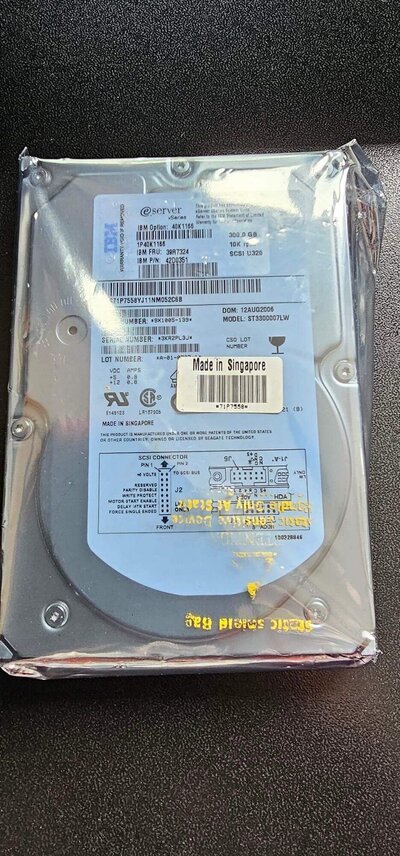
My 3.2.2 ROMs are now working. CDRW is recognised, but my nice SCSI hard drive isn't recognised by HDToolbox (Photo attched).

Got it set in SE mode, but no dice.

Any SCSI experts in the house?

Only Amiga makes it possible.
 
The photo was, in fact, not attached.
 

Attachments

  • FB_IMG_1717355232172.jpg
    FB_IMG_1717355232172.jpg
    430.6 KB · Views: 14
Curiouser and curiouser.

I have two seemingly IDENTICAL 68pin to 50pin SCSI adapters. When one of them is plugged into the SCSI chain even with no device attached, the system won't boot, just hangs. What's going on there? Can't see any bad solder points or bridges.

Apparently these drives should work with the Amiga SCSI.

Urgh.
 
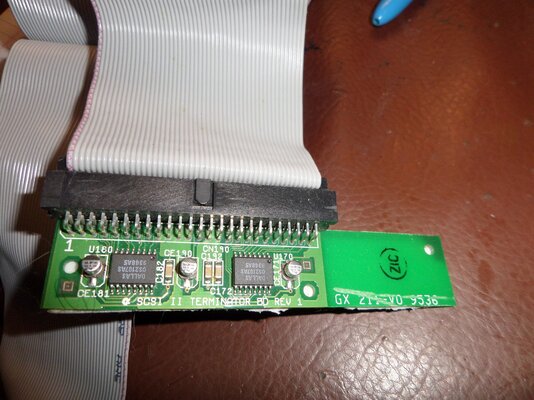
The drive termination is required with the SCSI device: A4000T SCSI Controller -- Drive -- Drive -- Termination
 
The 50-pin termination in on the I/O board in the back, although on my two, I cut it off to make cable routing easier
 
What fixed 3.2.2? Did you get the new roms?

You know hdtoolbox only scans the one device it it told to scan, right? (In its icon tooltypes) Is it set to scan the scsi?

What are your SCSI dip switches set to? Default is off (down) for all of them.

Bfg works just fine with the scsi on my 4000T.
(I don’t think it’s a dma bus master)

BDB: You did what, and why? (Dip #7 set to OFF enables scsi termination on the motherboard and disables external SCSI)
 
What fixed 3.2.2? Did you get the new roms?

You know hdtoolbox only scans the one device it it told to scan, right? (In its icon tooltypes) Is it set to scan the scsi?

What are your SCSI dip switches set to? Default is off (down) for all of them.

Bfg works just fine with the scsi on my 4000T.
(I don’t think it’s a dma bus master)

BDB: You did what, and why? (Dip #7 set to OFF enables scsi termination on the motherboard and disables external SCSI)

As I was saying, the CDRW is working fine now. HDToolbox is set to scan on 2nd.scsi.device. All Dip switches are set to OFF, A4000T is unit 7, HD is unit 0, DAT drive is unit 1, CDRW is unit 2, going into the terminator built in to the A4000T.

I wonder if the fact that the upper 8 bits aren't being terminated is an issue?
 
What fixed 3.2.2? Did you get the new roms?

You know hdtoolbox only scans the one device it it told to scan, right? (In its icon tooltypes) Is it set to scan the scsi?

What are your SCSI dip switches set to? Default is off (down) for all of them.

Bfg works just fine with the scsi on my 4000T.
(I don’t think it’s a dma bus master)

BDB: You did what, and why? (Dip #7 set to OFF enables scsi termination on the motherboard and disables external SCSI)
On the A4000T both the IDE and SCSI use the same scsi.device. All the dip switches should be left in the default. screwing with them is never needed
 
BDB: You did what, and why? (Dip #7 set to OFF enables scsi termination on the motherboard and disables external SCSI)

An SCSI chain goes [TERM] -- controller -- [DRIVE] -- [DRIVE] -- [TERM]
The dip switch set termination for the controller end, but not the other end. In the A4000T, the end termination, being on the I/O Board, forms a big loop. With it free, the cable can be left out of the way at the lower end of the case.

I have attached pictures of my A4000T opened up to illustrate this
SAM_6155.JPG
 

Attachments

  • SAM_6154.JPG
    SAM_6154.JPG
    455.5 KB · Views: 6
Would improper termination cause the drive not to get recognised at all? The built in terminator won't terminate the upper 8 bits of the SCSI bus. Ordering some adapters with high byte termination to see if that makes the drive play nice with the A4000T.
 
Would improper termination cause the drive not to get recognised at all? The built in terminator won't terminate the upper 8 bits of the SCSI bus. Ordering some adapters with high byte termination to see if that makes the drive play nice with the A4000T.
If the 50-pin cable terminates in a 50-pin terminator, all (8) data lines are terminated (this means that the data lines are prevented from "ringing " or signal degredation). For a 68-pin cable, a matching 68-pin terminator is used.
 
If the 50-pin cable terminates in a 50-pin terminator, all (8) data lines are terminated (this means that the data lines are prevented from "ringing " or signal degredation). For a 68-pin cable, a matching 68-pin terminator is used.

No. The hard drive is 68 pin. The cable is 50 pin. Therefore the upper 8 bits aren't being terminated.
 
Back
Top Bottom