A4000T not working

  • Thread starter Thread starter JHanna
  • Start date Start date
  • Replies Replies 119
  • Views Views 4139
Right so I got a trusty old 50-pin SCSI hard drive. Got it all plugged in. Copied everything from the existing IDE drive, no issues. Went to copy from the SCSI CDRW and it crashed exactly as before.

What a nightmare.

So just for a laugh I booted with no startup-sequence, mounted cd0: ran loadwb, didn't load anything else, and everything worked fine!

What the hell is 3.2 doing that causes SCSI to SCSI transfers to fail?!
 
Right so I got a trusty old 50-pin SCSI hard drive. Got it all plugged in. Copied everything from the existing IDE drive, no issues. Went to copy from the SCSI CDRW and it crashed exactly as before.

What a nightmare.

So just for a laugh I booted with no startup-sequence, mounted cd0: ran loadwb, didn't load anything else, and everything worked fine!

What the hell is 3.2 doing that causes SCSI to SCSI transfers to fail?!

Never had this issue, so not sure..
I suppose you're running MMUlib with the BFG. Go over the settings there perhaps? Remove/disable the optional parts.
Is AsyncWB in your WBStartup? Try removing it and see if that helps.
 
I also just noticed that even running HDToolBox crashes the Amiga too. Always fails while scanning for devices. So I think that rules AsyncWB out.

I'll have a look at MMUlib. I just installed the version that came with OS3.2, my BFG didn't come with any software.
 
Another update just in case anyone else is following this lol.

Wiped everything, reinstalled 3.2 from scratch.

Installed MMUlibs present on the 3.2 install.

Now everything seems to be stable (i.e. SCSI never hangs and crashes the whole system.)

So just to recap:
Amiga 4000T
BFG9060 at 100MHz
ZZ9000
Triton Lite USB card
Amiblaster card (Prelude clone)
Yamaha Fast SCSI CDRW drive
Seagate Barracuda 18GB Fast SCSI drive

No other software installed apart from fresh 3.2 and the MMUlibs that came on the CD.

Gonna work my way through EVERYTHING and test as I go along.

I reckon the ZZ9000/P96 must've been causing previous instability issues.

Anybody got any thoughts?
 
Good progress. I would disable parity at least
 
I've read a bit through this but I can't see that and ACTIVE termination is used. That is the problem here, the end of the scsi cable needs an active terminator.
If your harddrive is set as ID 0 and everything else 1, 2 and so on, it should work, even with SCA80
 
I've read a bit through this but I can't see that and ACTIVE termination is used. That is the problem here, the end of the scsi cable needs an active terminator.
If your harddrive is set as ID 0 and everything else 1, 2 and so on, it should work, even with SCA80
False
 
Having a real nightmare with stability on this system, seems to only happen when copying data via SCSI so I'm going back to basics, wiping the drive and starting from scratch.

How many buffers should I use for the SCSI hard disk? What block size is best? I have an 060 and loads of RAM.

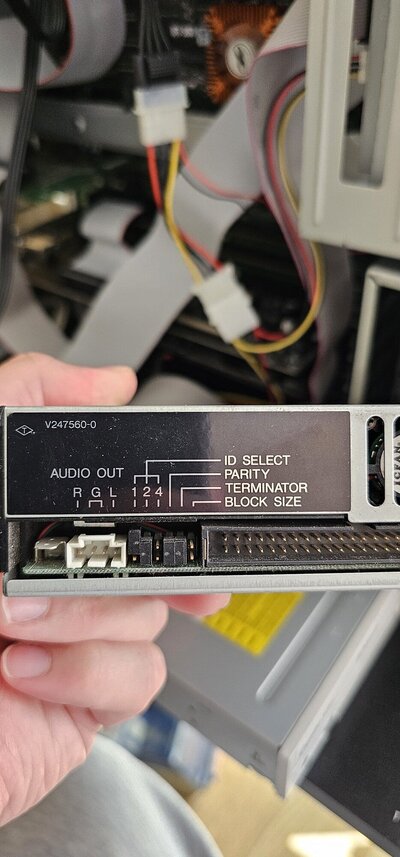
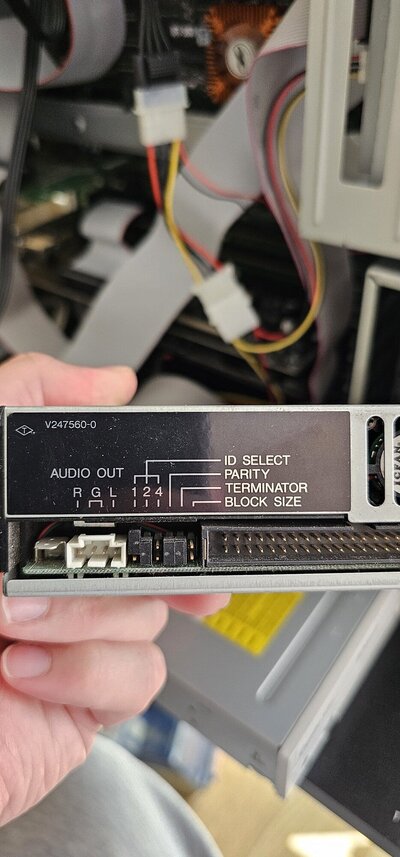
Also, what jumpers should be set on the Yamaha CDRW I'm using?

I'm keeping the SCSI HD as unit 1 and the CDRW as unit 2.

Sent a photo of the SCSI jumper settings.

I am so stressed out with this, can't see where I'm going wrong.

Same issue occurs using the A4000T's built-in active SCSI termination, or using the terminator option on the CDRW that's last on the chain.

Help!!
 

Attachments

  • 20240728_114535.jpg
    20240728_114535.jpg
    299.3 KB · Views: 7
  • 20240728_114535.jpg
    20240728_114535.jpg
    299.3 KB · Views: 5
Also...

Parity is enabled on the SCSI hard disk (the disable parity jumper isn't set), and enabled on the CDRW (the enable parity jumper is set).

Do I need to make a corresponding change in HDToolBox somewhere?

What does the SCSI Direct option do?
 
Also...

On the CDRW the Block Size junper sets the block size to 512 Bytes/sector. Should I have this on or off?
 
Also...

What should MaxTransfer be on the A4000T with an 060 and plenty of RAM and a Fast SCSI disk?

So many questions 😢
 
While IDE drives may have to have a lower transfer speed, I have always used the bog-standard that came up in HDToolBox. Around 2013, I was trying to get the maximum speed transfer out of my CSPPC's SCSI-3 controller, I changed it by a factor of 16 (adding and subtracting an 'F') and found no difference.
 
While IDE drives may have to have a lower transfer speed, I have always used the bog-standard that came up in HDToolBox. Around 2013, I was trying to get the maximum speed transfer out of my CSPPC's SCSI-3 controller, I changed it by a factor of 16 (adding and subtracting an 'F') and found no difference.

It doesn't refer to speed. It refers to the transfer size.
 
The transfer speed is limited by the implementation of Zorro III and a Zorro III card; it is somewhere around 13.5 MByte/s due to the limitations of the Buster chip. The speed of the SCSI-II device (between the SCSI controller and the SCSI drive, is at best 5 – 7 MB/s). Yet you find that the MaxTransfer number makes no difference to the amount of data moved.

Let me explain this in a concrete fashion: If you ask the SCSI bus to move 10 shoe boxes in 10 seconds, and then ask the SCSI bus to move 100 shoe boxes the next 10 seconds, then count the number of shoe boxes moved, you find you have the same number of shoe boxes moved. The MaxTransfer in observable quantity of data moved makes no real difference. Thus, I don't change it from the number that shows up on my HDToolBox. Somewhere along the way, there is an amount moved that matches the MaxTransfer, but in the case of shoes boxes, it seems to be 10 every 10 seconds
 
Using your analogy, MaxTransfer sets the size of the shoebox. Sometimes it makes sense to make the shoebox bigger as you cant fit more shoes in it. But sometimes if there's too many shoes in the box it becomes too heavy to lift, so you use a smaller box.
 
Using your analogy, MaxTransfer sets the size of the shoebox. Sometimes it makes sense to make the shoebox bigger as you cant fit more shoes in it. But sometimes if there's too many shoes in the box it becomes too heavy to lift, so you use a smaller
If your SCSI chain results in unstable transfers, and you have already made the decision that it is a software fault, then I will bow out and leave this discussion.
 
It's just the Amiga way. I used to love experimenting with it when I was younger, but now I just want a stable system that works 😞
 
If this still works without startup-sequence, I would look at MMUlib.

Install it in expert mode and disable all optional parts. You could try the newer aminet version as well. (But then disable fastIEEE)

Do you have a full 060 or an LC or EC model?

And check that asyncwb is disabled (removed from wbstartup). It did cause instability during OS beta testing, and does a lot of different things.

If booting without startup sequence makes no difference, I’d keep looking at hardware.
Try a short cable. And disable parity on every device!

Maxtransfer issue is a ‘bug’ (outdated ATA1 compliance) in scsi.device but only affects IDE versions of scsi.device, so not relevant here.
 
Back
Top Bottom