For Sale A500 IDE adapters, PS/2 mouse adapter, A600 CF adapter

  • Thread starter Thread starter mkl
  • Start date Start date
  • Replies Replies 914
  • Views Views 238209
Thanks for the info, I've done my best to follow it but I still must be doing something wrong: I've put in 3.1 ROMs, connected the OVR, INT2 and GND wires to the relevant pins on the expansion header, I have a 40-44pin IDE cable connected to a 44-pin CF adapter (CF adapter and card have been tested to work in other machines) but still nothing. Am I using the wrong kind of IDE cable? Is there a 40-pin CF adapter available somewhere? I have a 39-pin IDE cable but, of course, that won't work because it has 1 pin blocked, 40-pin ribbon cables seem to be hard to find. It's a rev6 board that I have modded for 1meg chip, could that be it? Any advice? Thanks!

Hi. Does your board have 5 or 6 pins header? 5-pin header has /ovr at the edge pin, but 6-pin header adds 1 pin for ground at the edge of pin row, so /ovr is the second pin from that direction.
Pin 20 location is filled in 80-wire ide cables, the pin can be removed completely by desoldering it. I've found that clipping it with side cutters can leave a stub stopping ide plug completely seated.
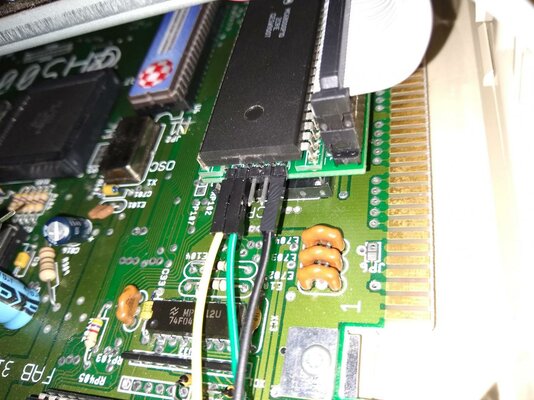
 
It has a 5-pin header (picture below) I'm assuming it's v402 and using this image from your installation guide. I used Amiga PCB explorer to find the right pins on the motherboard.
IDEheader.jpg

EzdineG - Thank you for the advice. I have formatted and partitioned the card on another Amiga already. I have a 39-pin CF adapter which I'm now going to try powering using the floppy drive power.
 
Can you use continuity meter from ide board ovr int2 pins to contacts at the card edge so that it tells they are connected via the wires and pads elsewhere
 
Thank you for the helpful replies mkl, I'll test these traces over the weekend, as well as test on another motherboard.

Assuming the ovr and int2 pines have continuity, are there any more things you can suggest I try while I'm at it?
 
Is there a guide on how to install it into an A1000?
There is also a 3 wired cable in the package, but I have no clue what to do with it.
 
can somebody who has also installed this in an A1000 help me? I have connected INT2, OVR and GND but WB 1.3 still shows me 512kb RAM. I took the signals from the expansion port (Pin 13, 17 and 19). This is beginning to frustrate as I'd expected to get this thing working out of the box. There is no guide or anything else for help.
 
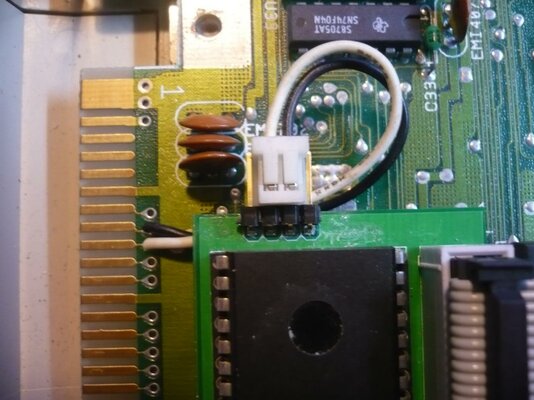
P1000596.jpg
In picture, the board is v106 (ide cable on other side than in v4xx),
the card edge is of interest, black wire is /ovr, white /int2

Like in A500, in A1000 card edge, /ovr is position 17 and /int2 is position 19 contact, on the top side. (even numbered contact positions are on the bottom.)
They are close to 68000's pin 32/33-end. (in a500 cpu pin 1/64 end is to front, in a1000 to back end of Amiga case.)
 
Last edited:
i give it up. RAM is recognized when i turn on the machine (tested in A500), but after a warm reset LED will turn off and WB will only show 1MB Ram. I tried Addmem but "Addmem 00200000 009fffff" freezes the machine. I hope the new card will solve this problem.
 
I had a look at this http://www.mkl211015.altervista.org/ram68k/mem68k59brd.png

There is J2 jumper which i closed. Now the LED lights up permanently, even when resetting but WB still shows 1MB Ram.

@mkl
you really should do a Guide for all the boards and configurations you made. This is really frustrating to look up all the scattered information from different topics and sites.
 
I sent the replacement board to Cego, and tested it and each socket holds pins individually using this method:IMG_20180818_213726.jpg

Possible problem of loose socket for 68000 pins, if height permits, could be solved by a dip-64 socket or sil-strips.
Augat socket good for many uses: https://www.ebay.com/itm/64Pin-8-3x2-6cm-IC-Socket-Goldpin-AUGAT/191994680185
I have used that type with non-thermoplastic frame for carrier and alignment socket for individual pins. Also for kipper2k ram+ide with short leads under board, in between to connect to a500 mainboard so it holds cood to socket.

Next, i will be collectig installation pictures to one page, adding signal names to pictures.
 
just a hypothetical question. Could this run installed in the CPU socket of an A500 in combination with an external Supra28 Turbo accelerator on the side expansion?
 
just a hypothetical question. Could this run installed in the CPU socket of an A500 in combination with an external Supra28 Turbo accelerator on the side expansion?

Tough question, but i guess it will work. If it uses autoconfig, one grounded pad needs disconnecting (a500) and connect autoconfig out to edge contact.
 
edit: attached cpld code not recommended, esp. on v6x fails, temp. fix in next posts
RAM config that has function to skip one external autoconfiguration before activating own autoconfig. This should make it compatible with CDTV, where I would expect DMAC chip to make on autoconfig cycle.
Tested with Amiga B2000 and KS3.1: when no other autoconfig cards present ram didn't autoconfig. When Supra SCSI-card was added, ram also autoconfigured.
Untested feature: RAM board tries to configure as 8MB, if told to shutup, try 4MB, and 2MB (8,6,4, or 2 MB configuration). I Could test this by putting Golem (2-8 MB) RAM card with e.g. 2MB to Zorro slot.
Files attached for V5x and V6x mem68k boards.

- - - Updated - - -

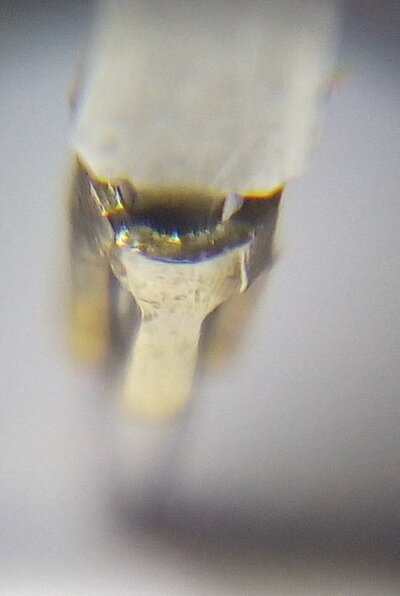
Problem when removing 68000 from socket pins that I've been using lately:
sockettijuttu.jpg
For a few pins, part of socket comes of with cpu pin. I could put and push them back to socket cups, but are tiny and get lost easy.
 

Attachments

Last edited:
I think there maybe some issues with v6x boards, with a tmp68hc000 on external side slot cpu adapter board + ram on mainboard test socket ram worked,
but mc68hc000 on ram , on mainboard, keeps resetting and doesnt boot.
I will be testing and trying to find the cause.
EDIT: possible fix posted below. (using older verilog source, abel code bug not found.)
 
Last edited:
Using older verilog source to make working(i believe, after quick testing) cpld code for v6x boards. compiled with xilinx ise 6. The Abel version still needs debugging.
edit:ucf file missing from zip, can be found on the www-page http://www.mkl211015.altervista.org/ram68k/
 

Attachments

Last edited:
The bug, I think is maybe refresh cycles not separated so that ram chip interpretes the signals as a read access cycle, interfering with cpu? And in v59 ram, data buffer chips would have isolated ram from cpu data bus. Perhaps for some reason, timings of some cpus mostly prevent bus conflict most of the time.
 
Last edited:
Back
Top Bottom