Installing MUI on A4000D

Stephen Summerson

Active member
AmiBayer
Joined
Jul 30, 2025
Posts
171
Country
United Kingdom
Region
Tyne and Wear
Hi,

Can anyone help, ive installed a Triton lite USB card on my A4000D and IBM version installed the Poseidon stack and drivers, but when I click on the Trident icon to open USB GUI, it says couldn't open MUImaster, even though I installed MUI 3.8 on OS3.9 regen but it won't work, can anyone help as ive been on this for 6 hours and got nowhere but installed the Poseidon USB stack and driver for Triton lite.

Any help would be greatly appreciated.

Kind Regards

Stephen
 
Can you please copy&paste what the CLI will give you after you type assign and then press the enter key?
 
Hi,

Can anyone help, ive installed a Triton lite USB card on my A4000D and IBM version installed the Poseidon stack and drivers, but when I click on the Trident icon to open USB GUI, it says couldn't open MUImaster, even though I installed MUI 3.8 on OS3.9 regen but it won't work, can anyone help as ive been on this for 6 hours and got nowhere but installed the Poseidon USB stack and driver for Triton lite.

Any help would be greatly appreciated.

Kind Regards

Stephen
This is weird. As I have just been playing around with this tonight. 👻 spooky!
By chance are you using AmigaOS 3.2.3?
What I have been experiencing is the MUI folder magically disappears after an Install in the Sys area.
If I Install then try arranging Icons the MUI folder is no longer is there. Or installing and rebooting the folder and files vanish.
Been running VirusZ in the background just incase I had a virus.
Also text editor.gadget in classes gadgets had a version 10.1 instead of 15.1
Might be worth a fresh install with just 3.2 and then try the MUI 3.8. To see.
Was going to try MUI 3.9 instead with Stackattack. But noticed weird stuff happening such as Icon information no longer works. So tried an Upgrade to 3.2.3 again, now FUBARD after a reboot. No screen showing.
#Amigalife
 
This is weird. As I have just been playing around with this tonight. 👻 spooky!
By chance are you using AmigaOS 3.2.3?
What I have been experiencing is the MUI folder magically disappears after an Install in the Sys area.
If I Install then try arranging Icons the MUI folder is no longer is there. Or installing and rebooting the folder and files vanish.
Been running VirusZ in the background just incase I had a virus.
Also text editor.gadget in classes gadgets had a version 10.1 instead of 15.1
Might be worth a fresh install with just 3.2 and then try the MUI 3.8. To see.
Was going to try MUI 3.9 instead with Stackattack. But noticed weird stuff happening such as Icon information no longer works. So tried an Upgrade to 3.2.3 again, now FUBARD after a reboot. No screen showing.
#Amigalife
I use 3.2.3 Roms yes and OS3.9 regen which i believe is 3.2.3.

My MUI folder is present but when I press install it says can't access locale20 or something like that, im not currently on my A4000D.

Kind Regards Stephen
 
Last edited:
Can you please copy&paste what the CLI will give you after you type assign and then press the enter key?
Hi, I dont know what you
mean by copy and paste what CLI will give me as I have never had this command happen during installation.

Kind Regards Stephen
 
after workbench has started:
1. right Amiga key + E (i.e. execute command item from workbench menu),
2. type newcli. The new Shell window will open.
3. type Assign and press enter. The list of system Assigns will be shown.
4. Copy it and paste to this thread (or at least attach a screenshot)
 
I use 3.2.3 Roms yes and OS3.9 regen which i believe is 3.2.3.

My MUI folder is present but when I press install it says can't access locale20 or something like that, im not currently on my A4000D.

Kind Regards Stephen
Okay Update time. I now seem to have fixed my issue. This is what I did:

1)… Re-updated with AmigaOS 3.2.3 to fix any version Anomalies (This also applied 3.2.3 icon.libraries). This now fixed my icon information issue. Prior I was using an old version of iconlibs46.4 off Aminet

2)… Re-edited s startup-sequence to put back in C SwitchControl (using a RATTE monitor switcher with Aga MK3 and Voodoo3 RTg card). Fixed my workbench back into place in RTG mode. Also put back stackattack syntax ready for MUI 3.9 installation.

3)..Installed MUI 3.9 from the Ibrowse website download page. For both Ibrowse Netbrowser and Poseidon V4.5 for RapidRoad x-surf 100 USB.

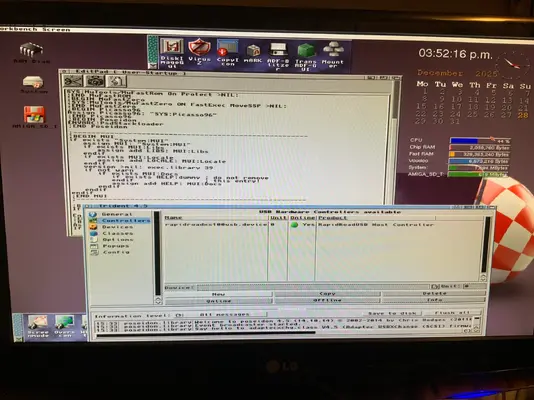
Just to note: make sure in your s user-startup MUI installer has placed assigns of MUI. See photo attached in what I mean.
 

Attachments

  • image.webp
    image.webp
    192 KB · Views: 5
Okay Update time. I now seem to have fixed my issue. This is what I did:

1)… Re-updated with AmigaOS 3.2.3 to fix any version Anomalies (This also applied 3.2.3 icon.libraries). This now fixed my icon information issue. Prior I was using an old version of iconlibs46.4 off Aminet

2)… Re-edited s startup-sequence to put back in C SwitchControl (using a RATTE monitor switcher with Aga MK3 and Voodoo3 RTg card). Fixed my workbench back into place in RTG mode. Also put back stackattack syntax ready for MUI 3.9 installation.

3)..Installed MUI 3.9 from the Ibrowse website download page. For both Ibrowse Netbrowser and Poseidon V4.5 for RapidRoad x-surf 100 USB.

Just to note: make sure in your s user-startup MUI installer has placed assigns of MUI. See photo attached in what I mean.
My recommendation is to remove NewMeter from WBstartup as it slows down the system.
 
I'll try this tomorrow, where do I find the icon to edit the startup sequence or can I access it through Shell via a command? Im good at hardware and building but this new age Amiga software has me absolutely at a loss, all your help is appreciated.

Kind Regards Stephen
 
MEmacs under Tools directory is a text editor. Once this is started you want to open Startup-sequence located in S directory. Make sure you create a backup of Startup-sequence before you modify the original.
 
I'll try this tomorrow, where do I find the icon to edit the startup sequence or can I access it through Shell via a command? Im good at hardware and building but this new age Amiga software has me absolutely at a loss, all your help is appreciated.

Kind Regards Stephen
In AmigaOS 3.9 you can use Editpad or in a shell the Ed command. To edit the User-Startup.

So open editpad and right click to open a file and it is under S

Or

Open a shell and type without the quotes “Ed S:User-Startup”

Again use right click and save if you have had to make any changes.

But as I have pointed out. The MUI installer should have already placed this syntax in your User-Startup sequence.

As a rule. Always choose “Intermediate” or “Expert” when running the MUI installer program.

Do recommend using MUI 3.9 over 3.8 due to fixes over 3.8.

Link to MUI downloads:


If using MUI 3.9 then you need to download stackattack2. Unpack with lha on the Amiga ONLY! Using lha. DO NOT use MS windows winRAR or Unzip as this does not unpack properly.

Stackattack2 from here:


Copy the Stackattack program into the C folder

Then again using either Editpad or Ed

For Ed it’s without the quotes “Ed s:Startup-Sequence”

After the syntax:

SetPatch
or
SetPatch >NIL

Add the following line:

Without the quotes: “C:StackAttack MIN 34000”

Also before the syntax Loadwb

Add the following line:

C:StackAttack AUTO

Then save.
 
In AmigaOS 3.9 you can use Editpad or in a shell the Ed command. To edit the User-Startup.

So open editpad and right click to open a file and it is under S

Or

Open a shell and type without the quotes “Ed S:User-Startup”

Again use right click and save if you have had to make any changes.

But as I have pointed out. The MUI installer should have already placed this syntax in your User-Startup sequence.

As a rule. Always choose “Intermediate” or “Expert” when running the MUI installer program.

Do recommend using MUI 3.9 over 3.8 due to fixes over 3.8.

Link to MUI downloads:


If using MUI 3.9 then you need to download stackattack2. Unpack with lha on the Amiga ONLY! Using lha. DO NOT use MS windows winRAR or Unzip as this does not unpack properly.

Stackattack2 from here:


Copy the Stackattack program into the C folder

Then again using either Editpad or Ed

For Ed it’s without the quotes “Ed s:Startup-Sequence”

After the syntax:

SetPatch
or
SetPatch >NIL

Add the following line:

Without the quotes: “C:StackAttack MIN 34000”

Also before the syntax Loadwb

Add the following line:

C:StackAttack AUTO

Then save.
Thanks so much, that makes sense so I think I'll manage it and I'll download MUI3.9 instead of 3.8, it might be easier to get it to work, its only to get my Triton lite USB card to work 😓
 
Thanks so much, that makes sense so I think I'll manage it and I'll download MUI3.9 instead of 3.8, it might be easier to get it to work, its only to get my Triton lite USB card to work 😓
You can still use MUI 3.8. And you don’t have to bother with Stackattack.
But 3.9 is a latter release and has some fixes.

Horses for courses.
 
Hi guys, when installing MUI3.8 it wants to install into the storage folder? What do i do with it then or is that the wrong folder?
 
Hi guys, when installing MUI3.8 it wants to install into the storage folder? What do i do with it then or is that the wrong folder?
That doesn’t sound right…

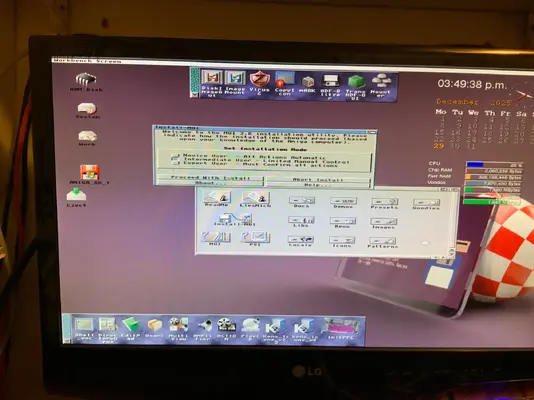
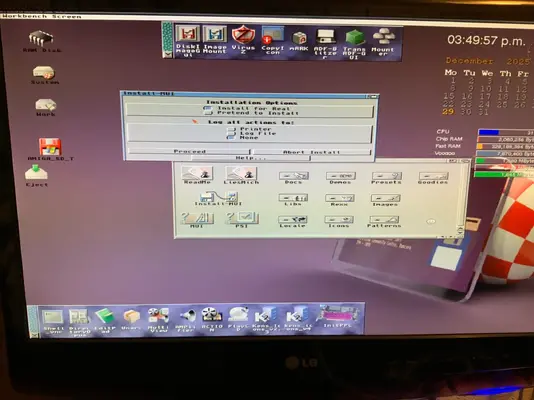
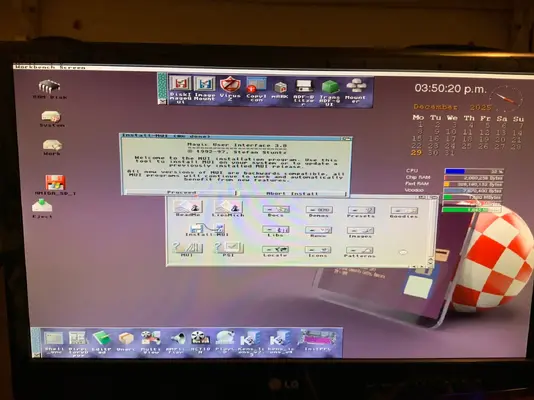
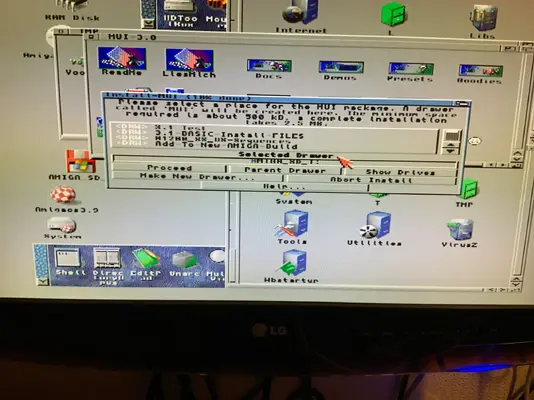
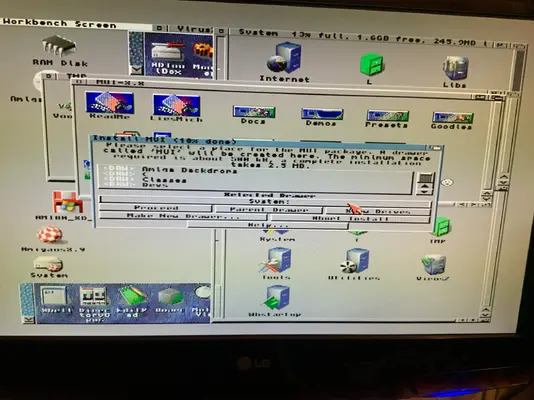
Here are some pics of a MUI3.8 installation using “Intermediate”.
The aim is to install MUI into your AmigaOS partition. Mine is called “System”. Not sure what you have called yours..
Hope this helps?

Note pic 4 & 5. The installation wanted to install in Amiga_SD_T
I clicked on “Show Drives” and changed this to “System” (My AmigaOS Partition). You change this to your AmigaOS partition. Then click Proceed.
 

Attachments

  • image.webp
    image.webp
    126.6 KB · Views: 2
  • image.webp
    image.webp
    112.4 KB · Views: 3
  • image.webp
    image.webp
    124.1 KB · Views: 3
  • image.webp
    image.webp
    146.2 KB · Views: 3
  • image.webp
    image.webp
    139.8 KB · Views: 2
Thanks for everyone's help. I got it sorted with MUI3.8 and Poseidon USB stack and now my Triton lite is working through Trident. One more job done, in not looking forward to installing a ZZ9000 card as apparently they're a nightmare! Anyway appreciate all of your input 👍
 
That doesn’t sound right…

Here are some pics of a MUI3.8 installation using “Intermediate”.
The aim is to install MUI into your AmigaOS partition. Mine is called “System”. Not sure what you have called yours..
Hope this helps?

Note pic 4 & 5. The installation wanted to install in Amiga_SD_T
I clicked on “Show Drives” and changed this to “System” (My AmigaOS Partition). You change this to your AmigaOS partition. Then click Proceed.
Appreciate it, it worked a treat!
 
Back
Top Bottom