My new A4000 =)

  • Thread starter Thread starter fitzsteve
  • Start date Start date
  • Replies Replies 128
  • Views Views 17667
just making sure :thumbsup:

so what method u use as I can`t remember if battery is alkaline or acid, got a feeling it alkaline so bring on the lemon juice for that lemony freshness but knowing me I`m probably wrong

Rocked the little fella till his legs broke then cleaned with meths.

Steve.
 
My Apollo 4040 arrived! YAY... :D

Here's some pics:

IMG_9617.jpg


What a peice of kit!

IMG_9618.jpg


RamZ on and ready to rock...

IMG_9619.jpg


IMG_9620.jpg


Nice fit, will also have plenty of space if I use the tall Simms.

IMG_9621.jpg


I like this shot, just ran the card for about an hour, 100% stable and dosen't get very hot. Yet to test the SCSI as the Buddha is driving my DVDRW.

IMG_9622.jpg


Brought it downstairs for setting up, will go back up when I pick up the white LCD I just splashed out on.

IMG_9623.jpg


Damn thats quick!

IMG_9625.jpg


Spent ages setting up CWB OS3.9 then realised I only have 3.0 roms, doh! So back to trusty old ADV SP till I find some upgraded RomZ...

Played some Doom, thats very smooth indeed, time to try out some other games.

Steve.
 
Nice pictures you made m8.
i was also Amazed how fast that card is.
Have lots of fun with your 4000.
everything found the right place in your house.
 
grrr I`m so evious :)

budda looks nice in there as well :thumbsup:
 
I picked up my LCD TV today :D

However its not 100% Amiga friendly, was disapointed to find the TV will not work properly with the Miggy's via RGB Scart, it only displays a flickery black and white picture in all modes, I also tried another scart and then moved onto Composite which had colour but such an awful picture I was about to cry :(

So I thought I'd try the VGA input via an RGB/VGA connector (not expecting anything) and was astonished to find that the VGA input will accept the native amiga screens :blink:

Its a crystal clear picture, amazing in full screen & AGA modes but there is flicker in the Interlaced modes which is a bummer since I'm using Classic Workbench ADV SP. (Soon to change to CWB OS3.9)

So I guess I have to get a flicker fixer or RTG for the workbench screens, I did see nice Picollo RTG card at Amibay but changed my mind due to the seller wanting a bank transfer, didn't want to send my cash to a zero feedback seller with no paypal protection.

For now I can use it as it is, just at High Res without Interlacing, I was going to go the Indi or RTG route at some point anyway...

Oh, almost forgot - some pics :thumbsup:

IMG_9646.jpg


IMG_9648.jpg


IMG_9651.jpg


IMG_9653.jpg


IMG_9649.jpg


Hope you enjoy the pics, can't wait till I sort out the higher res modes though...

Steve.

 
DCE Flicker Magic

DCE Flicker Magic

Well I got this cool piece of hardware today:

IMG_9691.jpg


IMG_9690.jpg


Sadly I can't show it working as the cable to the left has come away from the solder point

Although I was careful I must have knocked it when installing so once I've resoldered I'll report back...

Next time some hot glue goes on them cables to make them more secure!
 
Hey Guys,

Well the A4k is still out of action but that dosent stop me posting some pics of the Zorro cards I have lined up waiting to go into this machine :D

IMG_9930.jpg


IMG_9931.jpg


IMG_9927.jpg


IMG_9929.jpg


IMG_9928.jpg


Can't wait to get this all up and running :cool:
 
Lol, I paid <snippity>...<snip> for A4000! Of course, it had Deneb USB Cyberstorm 060, Cybervision 64/3d with scan doubler etc etc.... still, big difference in price. :)

Silly question, but why Classic WB?! Stick a gfx card in that bad boy and run 3.9!


[edit]
Sorry Ab's, I had to edit your post as it could be seen as price driving, I know you didn't mean it that way so please dont worry. Z
 
Last edited by a moderator:
Lol, I paid <snippity>...<snip> for A4000! Of course, it had Deneb USB Cyberstorm 060, Cybervision 64/3d with scan doubler etc etc.... still, big difference in price. :)

Silly question, but why Classic WB?! Stick a gfx card in that bad boy and run 3.9!


Its the Classic Workbench OS3.9 pack, so OS3.9 with lots of added extra's and goodies.

Yep, I'm putting a PicassoIV in there so will be running RTG :cool:

Its going to be awesome :D
 
Last edited by a moderator:
Snippity Snip?!

Snippity Snip?!

Lol, sorry Z, was late when I posted - did not even occurr to me at the time, thanks for the heads up. :)

Lol, I paid <snippity>...<snip> for A4000! Of course, it had Deneb USB Cyberstorm 060, Cybervision 64/3d with scan doubler etc etc.... still, big difference in price. :)

Silly question, but why Classic WB?! Stick a gfx card in that bad boy and run 3.9!


[edit]
Sorry Ab's, I had to edit your post as it could be seen as price driving, I know you didn't mean it that way so please dont worry. Z


---------- Post added at 06:00 ---------- Previous post was at 05:58 ----------

Yessum, will be a wonderful machine - almost finished tweaking my new A4k, had lots of fun. I am thinking of posting a software/hardware tweaking guide (sucker for squeezing out every ounce of performance) when I am done).

Oh, and P IVs overclock nicely, remember to use the O/C feature of P96. :)

Lol, I paid <snippity>...<snip> for A4000! Of course, it had Deneb USB Cyberstorm 060, Cybervision 64/3d with scan doubler etc etc.... still, big difference in price. :)

Silly question, but why Classic WB?! Stick a gfx card in that bad boy and run 3.9!


Its the Classic Workbench OS3.9 pack, so OS3.9 with lots of added extra's and goodies.

Yep, I'm putting a PicassoIV in there so will be running RTG :cool:

Its going to be awesome :D
 
Owe sooooooooooooooo much Kudos to Mr Zetr0 :cool::cool::cool:

My A4000 Mobo lives :bowdown::bowdown::bowdown:

:yourock::yourock::yourock:

:bounceBoingBall::bounceBoingBall::bounceBoingBall:
 
Cheers steve =)

To be honest I just love happy ending stories =)


So for the techies that wanna know -

replaced the LS174 (flip-flop), the F245 (octal transceiver) and the two 47uf feedy caps =)

The patient can now use a full deck of 16MB FAST RAM without yellow-screen of memory assertion failure =D


My only regret was not having time to take hardware pr0n shots =(


Although its still in the A4000 chassis ;) (daughter was giving brian the lion a beasting =D) -- for testing purposes of course lol.
 
By the way guys, will this all fit?

To start going to have:

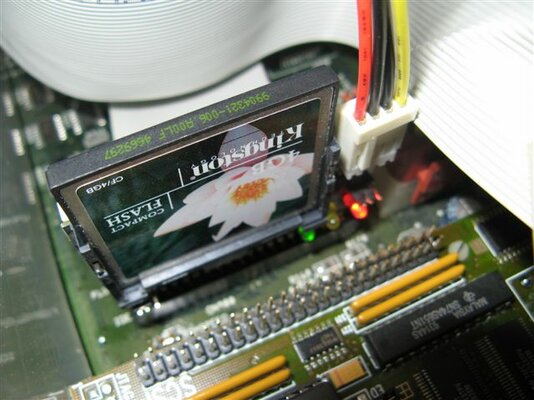
A4000 + CF-IDE on the native IDE (will do SCSI once I find a SCSI HDD)
My Apollo 4040 as the heart of this beast!
I'll have the DVDRW runing off the Buddha IDE (Top Zorro slot would help my cable routing)
I'll have the PicassoIV (is the bottom Zorro slot the one I need? (With Video slot))
I'll have the Tocatta in another Zorro Slot
I'll have the Z3 Fastlane in another Zorro Slot

Will I have enough slots for all these goodies? And should I think of some kind of extra cooling?

Also is there a particular order they should be in, i.e top to bottom?

I've got a hold of a full set of 4mb Simms for the Z3, so until I get an extra 64mb of Ram out of it until I play with SCSI.

Thanks guys - really looking forward to finishing this build. :D
 
Back
Top Bottom