
You are using an out of date browser. It may not display this or other websites correctly.
You should upgrade or use an alternative browser.
You should upgrade or use an alternative browser.
Raspberry pi on sale.
- Thread starter mjnurney
- Start date
- Replies 292
- Views 7786


Nice one LTAC 
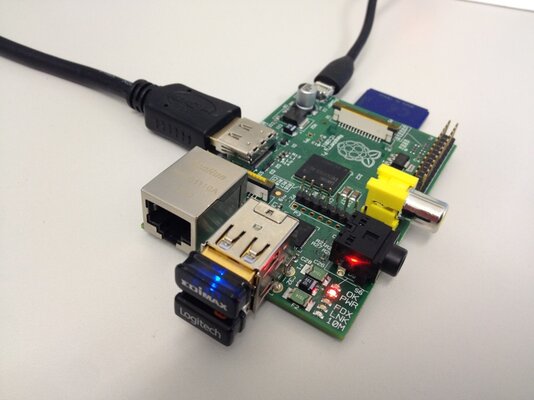
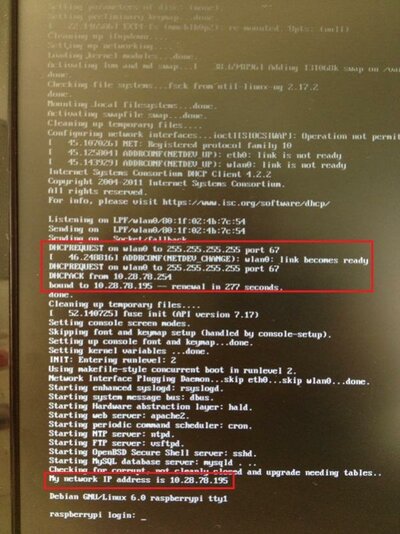
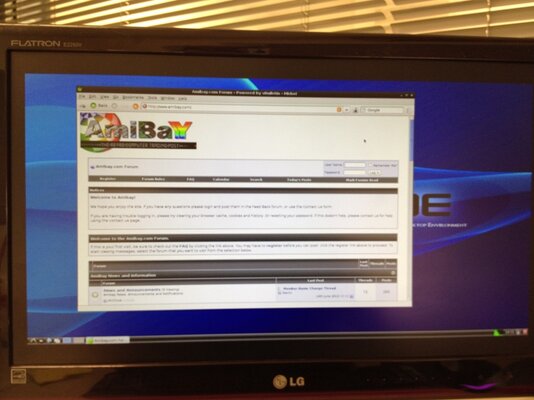
I successfully managed to install an awesome USB Nano WiFi dongle which works like a charm both under command line and X environments. Also one of the few that doesn't require an extra powered USB hub!
John my friend, there are plenty of cases out there (some expensive some cheap) but for now, I'm not thinking of one cause I haven't decided what I'm gonna do with my Pi yet
Who knows... lol
I successfully managed to install an awesome USB Nano WiFi dongle which works like a charm both under command line and X environments. Also one of the few that doesn't require an extra powered USB hub!
John my friend, there are plenty of cases out there (some expensive some cheap) but for now, I'm not thinking of one cause I haven't decided what I'm gonna do with my Pi yet
Who knows... lol

Nice one LTAC
I successfully managed to install an awesome USB Nano WiFi dongle which works like a charm both under command line and X environments. Also one of the few that doesn't require an extra powered USB hub!
View attachment 30400 View attachment 30402 View attachment 30401
John my friend, there are plenty of cases out there (some expensive some cheap) but for now, I'm not thinking of one cause I haven't decided what I'm gonna do with my Pi yet
Who knows... lol
Oh nice, none of my dongles work, Pi's unfortunately require one that has a low mA rating since the Pi itself only draws about 700mA and has to split it between both USB ports and itself...


Well, i managed to dig out a 2GB SD card i had collecting dust somewhere..
So, i dumped the image of Raspbmc on the SD, and went for a quick test.
Machine boots through solar power, reads the SD, and gives me video through the composite (RCA) video out.
As much as i wanted to hook my wireless kbrd/mouse set to it, i realized i had it with batteries discharged long ago.
However, i see no reason for this not to work tomorrow after a fresh charge.
So, without further delay, here's some more pics:


Yup, composite sucks! But this has proven one thing; solar power is adequate (Amperage makes the difference), SD is useable, video out works, system seems to report errors due to not finding a clock to sync to (Pi has no RTC, but updates through net), comes to login screen, oh, and did i mention composite video sucks!
So, i dumped the image of Raspbmc on the SD, and went for a quick test.
Machine boots through solar power, reads the SD, and gives me video through the composite (RCA) video out.
As much as i wanted to hook my wireless kbrd/mouse set to it, i realized i had it with batteries discharged long ago.
However, i see no reason for this not to work tomorrow after a fresh charge.
So, without further delay, here's some more pics:
Yup, composite sucks! But this has proven one thing; solar power is adequate (Amperage makes the difference), SD is useable, video out works, system seems to report errors due to not finding a clock to sync to (Pi has no RTC, but updates through net), comes to login screen, oh, and did i mention composite video sucks!


Am I the only person in the world that has 2?
No!
 Your're the second!
I've sent my second unit to my brother which does not know almost anything about computers. Poor RASPBERRY

Am I the only person in the world that has 2?
No!
I've sent my second unit to my brother which does not know almost anything about computers. Poor RASPBERRY
Haha, always nice to know
Although I've had both of mine for nearly a month... 1 is still in it's box and the other has been booted to linux once and not used since... I do have a purpose for one of them though... Gunna be connecting it up in the car and using it for live engine tuningWell, i managed to dig out a 2GB SD card i had collecting dust somewhere..
So, i dumped the image of Raspbmc on the SD, and went for a quick test.
Machine boots through solar power, reads the SD, and gives me video through the composite (RCA) video out.
As much as i wanted to hook my wireless kbrd/mouse set to it, i realized i had it with batteries discharged long ago.
However, i see no reason for this not to work tomorrow after a fresh charge.
So, without further delay, here's some more pics:
Yup, composite sucks! But this has proven one thing; solar power is adequate (Amperage makes the difference), SD is useable, video out works, system seems to report errors due to not finding a clock to sync to (Pi has no RTC, but updates through net), comes to login screen, oh, and did i mention composite video sucks!
Rofl free powered computing! Now were getting somewhere! If we can only do the same for our routers and monitors... We could be online during a localised blackout
what about the hubs and street switches are they backed up?We could be online during a localised blackout
there is so many things this could be used for
Ok fellas, first os boot! Now, i didn't have the patience to wait for batteries to charge, so i went for a wired Apple keyboard, and a MS wired mouse.
Both devices worked, so i booted Raspbmc. As i already mentioned, composite video sucks, but since my 'gameroom' is under "re-organization" and things are getting boxed to make room for the cockpit area, i just couldn't dig out an HDMI cable for better results.
Thus, a telly will have to do for the time being...


Response on the mouse pointer is a tad sluggish, and if you notice the two bars on the bottom right corner of the screen, CPU usage is almost tilt!
(that's with doing nothing but showing Summary Information)
Anyway, seems the panel still has enough juice to power anything i plugged into it.
Both devices worked, so i booted Raspbmc. As i already mentioned, composite video sucks, but since my 'gameroom' is under "re-organization" and things are getting boxed to make room for the cockpit area, i just couldn't dig out an HDMI cable for better results.
Thus, a telly will have to do for the time being...
Response on the mouse pointer is a tad sluggish, and if you notice the two bars on the bottom right corner of the screen, CPU usage is almost tilt!
(that's with doing nothing but showing Summary Information)
Anyway, seems the panel still has enough juice to power anything i plugged into it.

The GUI on xbmc has always used near full CPU. It's a know issue (and inherited from when it was originally on Xbox) but is too much effort to fix apparently.
Once in a video, the CPU usage is next to nothing
Sent from my iPhone using Tapatalk. Please excuse any crazy auto corrects or lack of detail (links to info sources)
Once in a video, the CPU usage is next to nothing
Sent from my iPhone using Tapatalk. Please excuse any crazy auto corrects or lack of detail (links to info sources)
Not yet, should have shipped about now though...
I will email them and let you know what they say
Info about the cause (and apparently new code to fix it, thats not enabled by default)
http://xbmc.org/theuni/2011/06/19/working-with-dirty-regions/
http://wiki.xbmc.org/index.php?title=Dirty regions
I will email them and let you know what they say
Info about the cause (and apparently new code to fix it, thats not enabled by default)
http://xbmc.org/theuni/2011/06/19/working-with-dirty-regions/
http://wiki.xbmc.org/index.php?title=Dirty regions
what about the hubs and street switches are they backed up?We could be online during a localised blackout
there is so many things this could be used for
Localised as in building wide :roll: lol But theyre not always on the same circuit
hi for xbmc you could use a media remote i do on the pcs
I do have a M$ media remote, but i'm in no hurry right now for the Pi John.
What mattered for me was to prove i could have an autonomous (as in electricity-independant) platform capable of media playing, gaming (with emulators) and surfing. I do have plans for 'encasing' it, but they're not top priority.
Similar threads


- Replies
- 1
- Views
- 163


- Replies
- 2
- Views
- 627

