Sold ZX Spectrum IDE Adapters

  • Thread starter Thread starter Zetr0
  • Start date Start date
  • Replies Replies 154
  • Views Views 30857
Status
Not open for further replies.
Arrived yesterday, thanks @Zetr0

First, I will test it with my +3e (I think my +3e ROMS are only for Divide, I need to test it).

What about using zx ide adapter on a +2 gray? where can I find those 128K roms needed for get it working? (burned, I'm unable to burn it by myself) :ninja:

:bowdown:
 
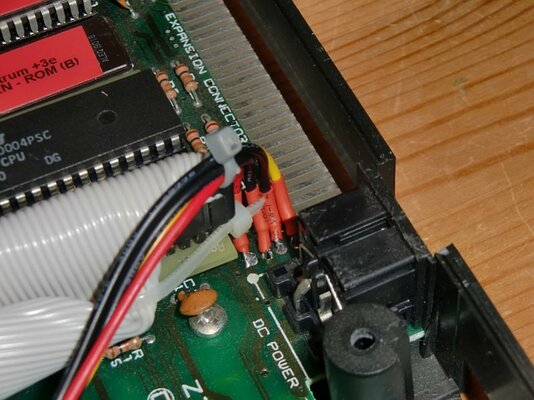
Using Pin 20 for +5v
This is perfectly possible and IF the cf card accepts it you can source this from either the motherboard or the CPU - BUT I will say - please becarefull... these Z80's are 20 years old, as are their ports - I personally dont trust them enough to want to sell them already configured this way.

I would urge anyone on say the +2AB/3 to pull this from the motherboard (it is labeled) - and those with the 48's and 128's to pull the +5 from the regulator

All these will have how-to's over this comming week.
Any chance of some how-to demos? Particularly in relation to pulling power from the motherboard? I notice in one of your original photos, there's a 5v pad under the cable...
 
If this is what you mean, here's the power from the mobo I did on my +2a.
From left to right it is +5v GND GND +12v

As Zetr0 says, the board is clearly labelled, and you can easily buzz it out from the back of the PSU socket if you're not sure.
 

Attachments

  • +2a (5).jpg
    +2a (5).jpg
    70 KB · Views: 2
If this is what you mean, here's the power from the mobo I did on my +2a.
From left to right it is +5v GND GND +12v

As Zetr0 says, the board is clearly labelled, and you can easily buzz it out from the back of the PSU socket if you're not sure.

And if you look at r0jaws' picture, there's a via connected to the +5V next to the back side of the PSU socket. I soldered a wire there in my +3. A via connected to the ground can be found a bit to the right from the PSU socket if you are looking the motherboard from the front.
 
Hi all. :thumbsup:

where can I find a manual .. how to use the commands? :help:

Regards
Pedro Henriques
 
zx

zx

Hi and thanks for the info. :thumbsup:
I have a CF 512mb . The max partition size is 16mb? :(

Regards
Pedro
 
Yes, but the 8 bit IDE will only allow you half that drive size anyway ie 512MB = 256MB.
256MB drive = 16x 16MB partitions
or preferably,
14x 16MB partitions and 2x 4MB Swap partitions.

But to put it in perspective, my DivIDE has several hundred games and Demos on a 64MB CF. They barely come to 12MB in total. :thumbsup:
 
Just finished wiring the prototype veroboard, all bells out OK.

Ready to install into my +4e (piccys will follow soon :shhh:)

For testing purposes I have a 4GB cf card, now having watched those lovely videos on youtube I still can,t quite see how to partition and create those multiple partitions or the syntax variations in the commands.

Anyone like to put a quick idiots guide together on basic steps and process.

I noticed on the youtube videos that fuse was using the same hard drive setup as the real hardware. Does this mean you can use the same cf card under fuse, or even better prepare and write it using fuse and then plug it into the speccy a la winuae.
Maybe test hardfiles exist....

Cheers
TC :cool:
 

The commands are all there chap...

format to 0,16

[Command] Master Drive (0), 16 Partitions.

New Data "Programs",16

Creates 16MB Partition called Programs.

Cat tab

Displays all your partitions.

On the home page is some software for transferring files, I'll do a step by step setup guide later on.
 
Thanks r0jaws, I just read the linky, makes much more Sense now :lol:

The format command is actually the partition command :Doh:

Oh well time to test

TC :thumbsup:
 
I was a bit premature with the software for transferring files, it's not as straightforward as it seems.
Zetr0 has been checking it out on WOS.
I've tried the 3e utility both with and without the GUI and met with problems.
One suggestion was to transfer the files via floppy, and this looks like it may be an option for the time being. Looks like my HxC will be called into service here as well.
 
I am still putting guides together, but for those that want to plow on ahead you will need the following programs

Drive Image

This is written by Pera Putnik, and can RAW READ and WRITE =D, on his site there is also a link to a HDF file for use with the PPROM (not +3e ROM)

For use with the +3e ROM, I use the Target Spectrum to initialize the Harddisk Device and then I raw-image read using Drive Image

I then place this image into FUSE - setup as a +3e (using the SM8EN ROM)

From that I then partition and configure the drive as I wish, you should only use one SWAP partition per device, (between 1 and 4MB)

to create a swap partition of 3MB on Device 0
Code:
NEW EXP "0>swap",3
Once configured, I then use Drive Image to write the HDF back to the Device =)


Moving Snapshots / Files to the 8bit IDE Disk

now, this is a little convoluted at the moment, but bare with me, I have some code I am working on to aleviate all this issue...

Firstly you need to download 3eStrowSaw10

This is a PC program that allows you to drag and drop onto +3e DOS formatted disks.... unfortuantely there is a catch here.

3eStrowSaw10 only allows for 16bit devices (including HDF files) as it wont use half sectors (8bit hdf's and devices).

Instead, I use FUSE with the +3e ROMS (DivEN+3e) to create a 16bit formatted +3e DOS HDF file.

I then drag and drop all my Z80 snap shot files using 3eStrowSaw10, once this is done, I then use the emulator to create lots of spectrum 3" disk files, with lots of snapshots on them... then I switch over to the 8bit SM8 +3e ROMS and use my 8bit HDF file, and copy all the snapshots from the disks to the (HDF) harddisk

once I am happy with that I then use Drive Image to copy the HDF back (over) the IDE device I am using on the host spectrum

So its a little convoluted, but with a little work you can quickly build up a snapshot game library, I have been working on this from the WoS library, I hope to be able to have them host it when its complete.

In the mean time I am writing a PC program that allows you to create / manipulate +3e DOS partitions and files in both 8 and 16bits.

 
You're not wrong that's convoluted. :lol:
I'll give it a go tomorrow I think.
 
Looking forward to firing mine up

Sent from my GT-I9100 using Tapatalk
 
What size of CF cards have you been using with the adapter? I'm having a bit of a trouble with a 4GB Kingston and I'm trying to isolate whether it's the card that's causing it.
 
Status
Not open for further replies.
Back
Top Bottom