Sold ZX Spectrum IDE Adapters

  • Thread starter Thread starter Zetr0
  • Start date Start date
  • Replies Replies 154
  • Views Views 30857
Status
Not open for further replies.
I've got a 512MB Kingston CF, I had a 256MB Kingston, but I got all sorts of errors.
 
Hiyas my friend,

its here with your Spectrum +3e

at the moment I am refurbishing the 3" drive, with luck it will be collected Friday.

Would of been earlier but I lost the drive belts lol, fortunately my friend AtariJay came over earlier to help move some boxes, so NOW we are rocking =D
 
Hi there Zetr0,

a bit off topic I know but I hope you are not trying to do too much too soon, you have only just got out of hospital and should be taking it easy for a while till you recover.

The videos for the IDE interface showing how to format the card and partition it etc are easy enough to follow and the link to the instruction page from r0jaws helps a lot too, so don't go trying to do everything all at once, there will always be a tomorrow or the next day etc and most of us could do with trying to solve the odd problem now and then ;)
 
You also have to remember doing what makes ya happy can be the
best medicine in the world..

:coffee:
 
What size of CF cards have you been using with the adapter? I'm having a bit of a trouble with a 4GB Kingston and I'm trying to isolate whether it's the card that's causing it.


Same here, Kingston 4GB

TC :lol:

Same here as in you're having trouble with Kingston 4GB or just same here as in Kingston 4GB? :unsure: :)
 
Hi Zetr0, hope you are still keeping well after your stint in the hospital

can't beleive I missed your thread on WoS, been looking for something like this (or a zxmmc) for ages and just wondering what you've got left

are you going to r3play next week? be nice to say hi
 
What size of CF cards have you been using with the adapter? I'm having a bit of a trouble with a 4GB Kingston and I'm trying to isolate whether it's the card that's causing it.

I'm using a 2GB SanDisk Ultra and not having any problems.
 
What size of CF cards have you been using with the adapter? I'm having a bit of a trouble with a 4GB Kingston and I'm trying to isolate whether it's the card that's causing it.


Same here, Kingston 4GB

TC :lol:

Same here as in you're having trouble with Kingston 4GB or just same here as in Kingston 4GB? :unsure: :)


Same issues, I spoke with zetr0 who has used 2GB cards with success, it may well be that 4 is too big for the current firmware.

TC. ;)
 
Same here, Kingston 4GB

TC :lol:

Same here as in you're having trouble with Kingston 4GB or just same here as in Kingston 4GB? :unsure: :)


Same issues, I spoke with zetr0 who has used 2GB cards with success, it may well be that 4 is too big for the current firmware.

TC. ;)
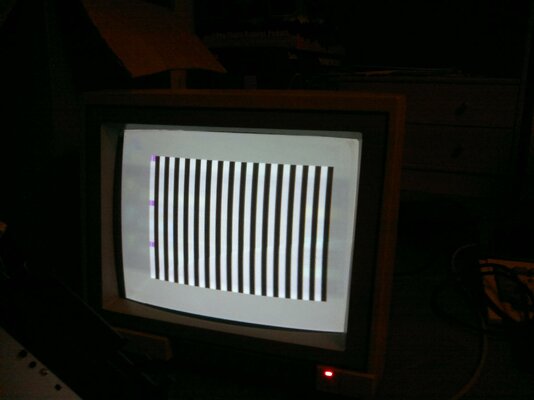
Just bought a 2GB Transcend but I am still having the same kind of symptoms (black and white vertical stripes on screen, when trying to boot).
 
This is very strange, I have setup a 2GB transcend here, and that was working on the +2e, thats the biggest CF I have tried, I have also tried a few 2.5" drives 80MB and 180MB (giving me 39MB and 81MB respectiuvely.

The largest I have used again is a 1.8GB 2.5" drive, the largest 3.5" HDD was again 2GB (2.2GB actually).

I have a lot of larger drives so I will try them today, but I fear there maybe a limit to the hardware when combining this with CF IDE adapters and CF cards.

I have some CF IDE adapters that just DONT SEE the CF card, I have just sent one of the ones I have here to TC so he can have a play see if its an ATA IDE issue with the Kingstons.
 
Just to confirm, the CF-IDE adapters need only +5V, right? At least the one I initially tried had the +12V from the molex not connected. The CF adapter led flashes as it was trying to access the card. It's also strange that as long as there's an open circuit (no card in CF adapter), the Spectrum boots normally. So you can have the 8-bit IDE adapter and CF card adapter connected and everything works.

Here's a picture of my screen:

Should this bit be moved to the oracle section?
 

Attachments

  • 26102011447.jpg
    26102011447.jpg
    163.1 KB · Views: 8
Now, thats VERY interesting....


hmmm, before we start dismantling the unit, do you have a smaller CF card or perhaps a 1 or 2GB IDE hard-disk to test?


Also how long is the IDE cable?
 
I can try the 1 GB CF card from my A1200 but that's a Kingston one. I should have some small hard drives too but I nave to do some digging for those. The cable that I have is about 10 centimeters.
 
@protek

Try a normal full length IDE cable & check that all the Pins of the Z80 have seated correctly & the socket pins onto the Mobo socket...

it looks like a bad connection between the Z80 & spectrum mobo...

I have got mine working successfully with a 128MB Hitachi CF but I gave up on the 4GB Kingston even after multi partitioning & Fat 12 formatting etc..... I kept getting Drive not ready also you could see that the Read LED was staying on for very long periods....

Mine is a prototype handwired but I have noticed noise or 'standing' wave issues with very short cables causing data errors... you could see reflections occouring when I scoped the data bus... I found a 25CM cable run stable and as much as I would like to cut it shorter to test I don't have any 40pin headers left :lol:

TC ;)
 
@TheCorfiot

I tried with a normal length cable but that didn't help. I tried pushing the adapter into the socket but it made no difference and the Spectrum boots normally if I just remove the CF card out of the equation.

@Zetro

I tried also with a 60 Megabyte regular hard drive powered by A4000's PSU. If it was set to master, I got the stripes like in the picture. If it was slave, I got the copyright texts but no boot menu. The latter has occurred with the other CF card adapter also, if it was set to slave.
 
Try a normal full length IDE cable & check that all the Pins of the Z80 have seated correctly & the socket pins onto the Mobo socket...

...

Mine is a prototype handwired but I have noticed noise or 'standing' wave issues with very short cables causing data errors... you could see reflections occouring when I scoped the data bus... I found a 25CM cable run stable and as much as I would like to cut it shorter to test I don't have any 40pin headers left :lol:
So we'd be better off using a normal length IDE cable? I've been looking for short ones (as used in the Amiga CF-IDE kits but 40-pin rather than 44).

Is there a technical reason for the reflection problem with short cables? Why wouldn't it effect the Amiga adaptors which invariably come with 3-5cm cables?

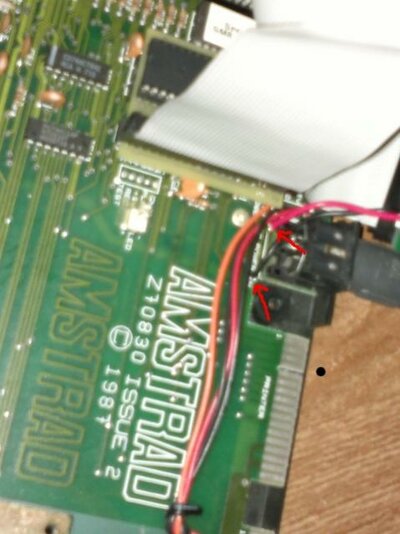
Could someone post pics of their power-wiring (Speccy board to Zetr0's adaptor, preferably on a +3)? I assume I only need 2 wires (+5v and Ground) connected. The motherboard on the +3 is marked but which connectors on the Zetr0 board should these be connected to?
 
.....Could someone post pics of their power-wiring (Speccy board to Zetr0's adaptor, preferably on a +3)? I assume I only need 2 wires (+5v and Ground) connected. The motherboard on the +3 is marked but which connectors on the Zetr0 board should these be connected to?

Are you wanting to draw power through zetr0's adapter for your IDE device rather than just straight from the spectrum motherboard?
The adapter doesn't require any extra power connections itself, and it is quite easy to get the +5 and GND for your IDE device from the motherboard with a little soldering.
 
@UKRetroGamer

Attached is a picture, how I connected the power for the CF card adapter. Red is +5V and black is ground.
 

Attachments

  • 28102011451.jpg
    28102011451.jpg
    39.2 KB · Views: 2
Status
Not open for further replies.
Back
Top Bottom