Basic Guide on Setting up a Prometheus (Firebird) Daughterboard on A3000 and A4000 now here on Amibay

  • Thread starter Thread starter Boing-ball
  • Start date Start date
  • Replies Replies 110
  • Views Views 9713
Have you tried the RTL card in different PCI Slots? How certain are you that the card you have is working?
I have altered the position of the voodoo and the RTL8139 cards in the 4 pci sockets, but did not tried all possible positions šŸ˜€

I’ll try that soon

But first I need to re-install all over from beginning because yesterday when I was installing the Posiedon USB stack for the Elbox Spider II pci card software, the OS didn’t boot after that installation.

I’m not worried because I’m testing with two CF memory cards and I have an OS image which speeds up the process, and allows me to use your suggested installation procedure.

As soon i have one CF card ready with MMULibs, Picasso96, Prometheus and openPCI libraries I’ll test the RTL8139 in all PCI socketsšŸ˜€
 
Just to note. The USB card I am using is just an NEC branded card. Although it shouldn’t make any odds. The Spider II will have an extra something in its BIOS to identify as a Elbox Spider-II. It would be best to try just the Voodoo and The Network card first, just in-case.
 
Have you tried the RTL card in different PCI Slots? How certain are you that the card you have is working?
ordered another RTL8139
I'll check it again when the new PCI card arrives

I moved over to install the ELBOX Spider II PCI USB card (the only PCI USB card I have presently)
I followed the USB Setup instructions
1. Install Poseidon V4.5 then Restart => Installed the Poseidom4.lha which is available from the EBOX support website (Spider II download area)

2. Install Arackattack when asked to choose ā€œPoseidonUSBā€. This will take some time and appear to have locked up. Then click proceed. => Downloaded the version from Aminet (link you provided)

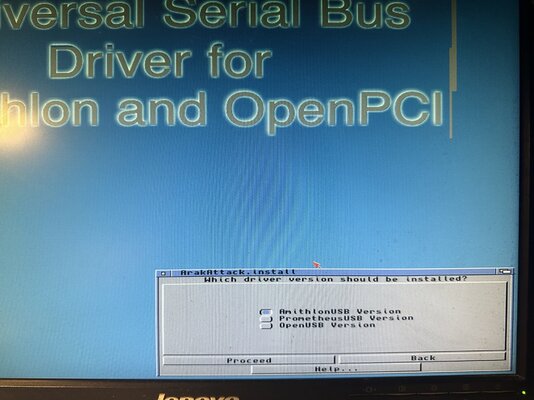
During the Arackttack installation, I couldn't see the option "PoseidonUSB" (instead 3 options were shown, one for "AmithlonUSB", another for "PrometheusUSB" and the last "openUSB" (OpenPciUSB) image attached.


3. Open prefs:Trident and make sure that there are 3 ports online and active. => No ports show as active

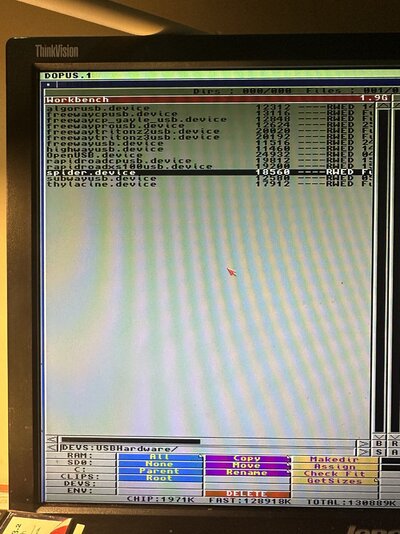
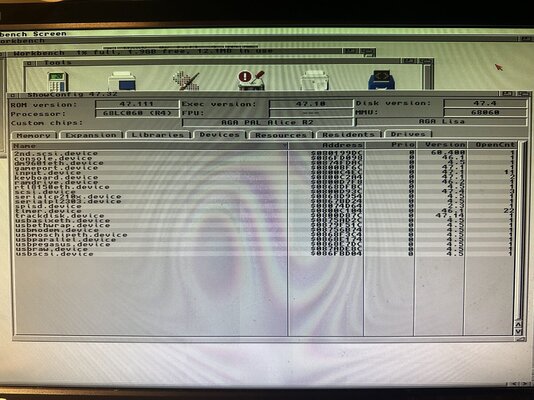
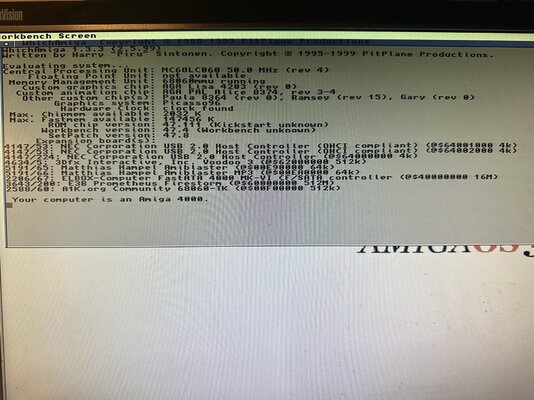
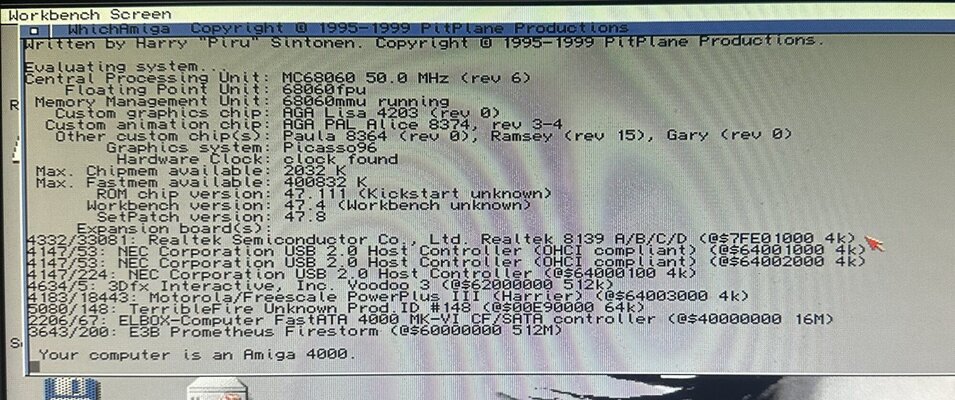
I have one ELBOX Spider II installed (see the witchamiga image attached). I have spider.device file at Devs:HardwareUSB but is not seen as loaded (see image, showconfig devices area) in the system. Does the ELBOX spider device driver only works with the ELBOX PCI.Library loaded??
Although the spider.device file in the Devs folder have not been loaded by the OS.
 

Attachments

  • IMG_6281.jpeg
    IMG_6281.jpeg
    565.6 KB · Views: 26
  • IMG_6286.jpeg
    IMG_6286.jpeg
    520.1 KB · Views: 24
  • IMG_6287.jpeg
    IMG_6287.jpeg
    663.9 KB · Views: 29
  • IMG_6288.jpeg
    IMG_6288.jpeg
    633.8 KB · Views: 30
ordered another RTL8139
I'll check it again when the new PCI card arrives

I moved over to install the ELBOX Spider II PCI USB card (the only PCI USB card I have presently)
I followed the USB Setup instructions
1. Install Poseidon V4.5 then Restart => Installed the Poseidom4.lha which is available from the EBOX support website (Spider II download area)

2. Install Arackattack when asked to choose ā€œPoseidonUSBā€. This will take some time and appear to have locked up. Then click proceed. => Downloaded the version from Aminet (link you provided)

During the Arackttack installation, I couldn't see the option "PoseidonUSB" (instead 3 options were shown, one for "AmithlonUSB", another for "PrometheusUSB" and the last "openUSB" (OpenPciUSB) image attached.


3. Open prefs:Trident and make sure that there are 3 ports online and active. => No ports show as active

I have one ELBOX Spider II installed (see the witchamiga image attached). I have spider.device file at Devs:HardwareUSB but is not seen as loaded (see image, showconfig devices area) in the system. Does the ELBOX spider device driver only works with the ELBOX PCI.Library loaded??
Although the spider.device file in the Devs folder have not been loaded by the OS.
Hi,

It’s been a while. Go for ā€œPrometheusUSBā€, if that doen’t work try openUSB. The Spider-II USB driver is only meant for the Elbox Mediator PCI board. So that will be no use to you using a Prometheus.
 
Ok
And how to configure Poseidon Trident on prefs ?
It asks for a device driver .
 
My new RTL8139 arrived
Confirmed that the other one was damaged

The new one is properly detected
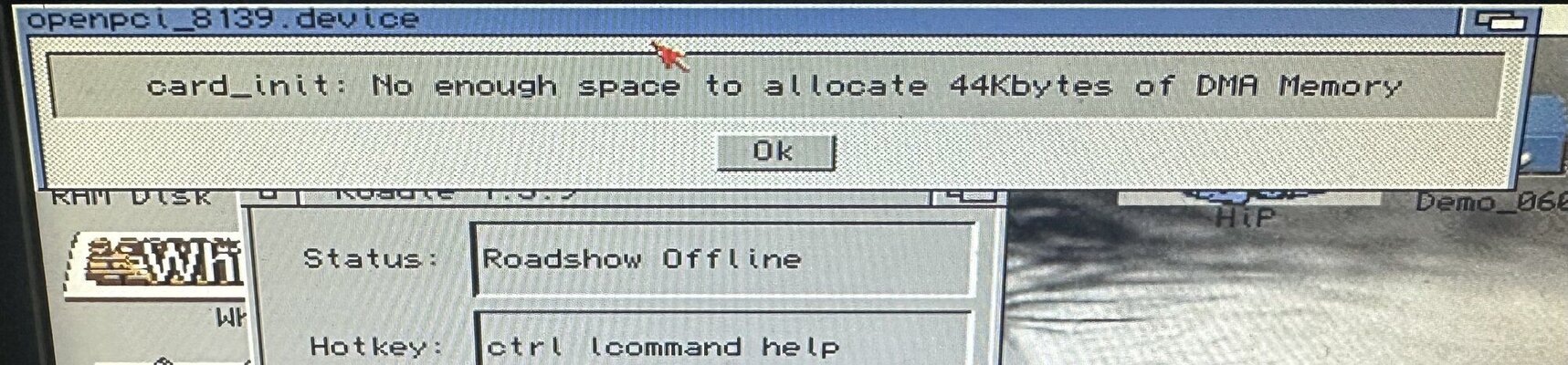
The issue is that when I try to connect it on roadshow I get an error that I cannot allocate 44kByted of DMA memory

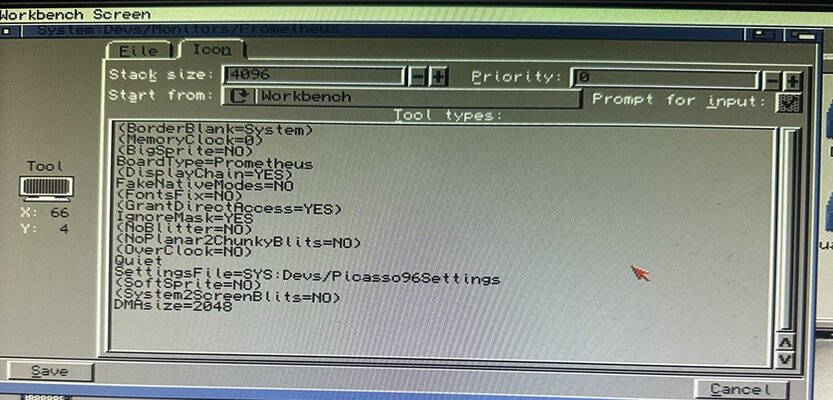
My Voodoo 3 2000 have the DMAsize=2048

did I missed anything ?
 

Attachments

  • IMG_6718.jpeg
    IMG_6718.jpeg
    513.9 KB · Views: 24
  • IMG_6716.jpeg
    IMG_6716.jpeg
    255.3 KB · Views: 22
  • IMG_6717.jpeg
    IMG_6717.jpeg
    352.2 KB · Views: 24
  • IMG_6719.jpeg
    IMG_6719.jpeg
    529.3 KB · Views: 29
My new RTL8139 arrived
Confirmed that the other one was damaged

The new one is properly detected
The issue is that when I try to connect it on roadshow I get an error that I cannot allocate 44kByted of DMA memory

My Voodoo 3 2000 have the DMAsize=2048

did I missed anything ?
Yep.

As per my guide:

On power up of the Amiga workbench if you get ā€œCard_init: No memory for DMAā€ then check the Prometheus monitor file has the DMAsize=2048k (the k on the end is not a typo, has to be included in the line).

The entry you have just has DMAsize=2048

It has to be DMAsize=2048k
 
My new RTL8139 arrived
Confirmed that the other one was damaged

The new one is properly detected
The issue is that when I try to connect it on roadshow I get an error that I cannot allocate 44kByted of DMA memory

My Voodoo 3 2000 have the DMAsize=2048

did I missed anything ?
Yes the k. DMASIZE=2048k
 
Thank you
DMA memory error solved

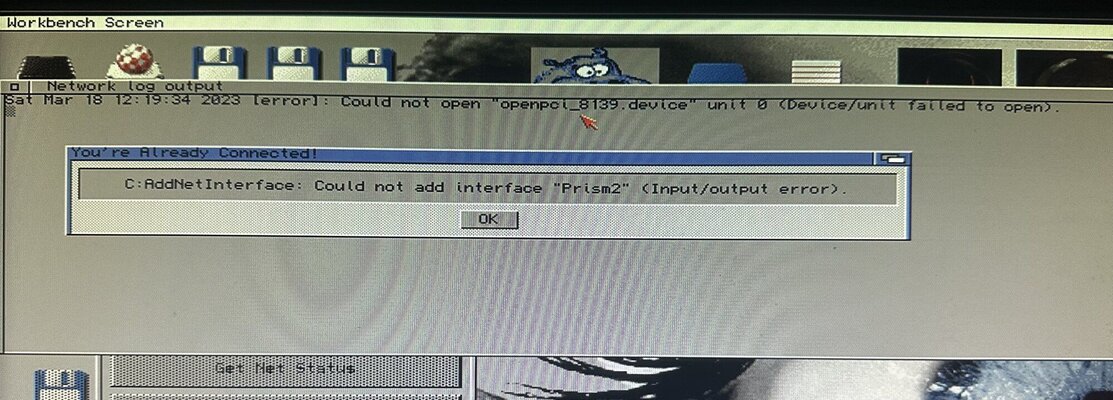
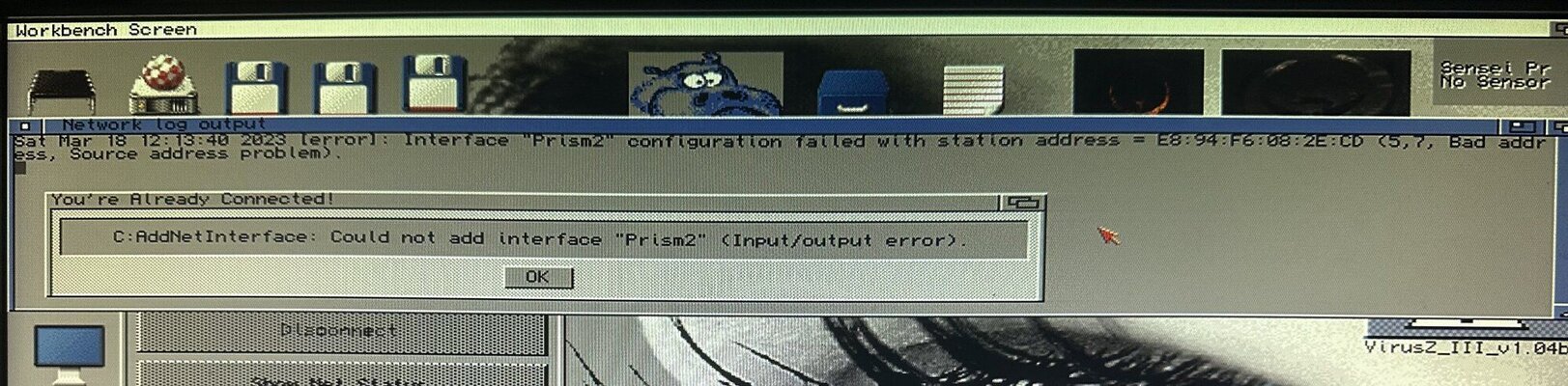
But now I get another one
I may need to connect a network cable to my router
The one I have is too short
 

Attachments

  • IMG_6720.jpeg
    IMG_6720.jpeg
    252.8 KB · Views: 28
Thank you
DMA memory error solved

But now I get another one
I may need to connect a network cable to my router
The one I have is too short
The RTL cards as far as I understand it doesn’t use prism2. This is for PCMCIA network cards.

You did get the drivers as specified in the guide?

OpenPCI Libraries and Drivers (Network Card - openpci-rtl8139) Link: http://bvernoux.free.fr/DevPCI.php#drivers
 
Now I got the cannot allocate 44kByted of DMA memory error with rtl8139, but my setup differs a bit.

A4k + Firebird (Hese) + Cybervision 64/3D in Zorro slot. I have DMAsize=2048k in tooltypes and monitor file renamed to Prometheus. RTG itself works.

So does the RTG card need to be PCI card for DMA to work?
 
Now I got the cannot allocate 44kByted of DMA memory error with rtl8139, but my setup differs a bit.

A4k + Firebird (Hese) + Cybervision 64/3D in Zorro slot. I have DMAsize=2048k in tooltypes and monitor file renamed to Prometheus. RTG itself works.

So does the RTG card need to be PCI card for DMA to work?
As far as I understand it. Yes the Prometheus channels the DMA from a PCI RTG card such as a Voodoo or Radeon card, very much the same as the Mediator boards do. This is if you are using other PCI cards. For Zorro-III it’s just the same as the normal Daughterboards.
 
Last edited:
As far as I understand it. Yes the Prometheus channels the DMA from a PCI RTG card such as a Voodoo or Radeon card, very much the same as the Mediator boards do. This is if you are using other PCI cards. For Zorro-III it’s just the same as the normal Daughterboards.
Thanks for confirming this, another lesson learned.

Found elsewhere, that even S3 Virge / Trio cards would work. I think I'll hunt for those too, they don't cost arm, leg and two souls.
 
Last edited:
Good evening
Could you help me solve this problem:I installed a 4 USB port card with NEC chip on my firebird a4000.I installed Poseidon 4.5 restartI installed Arakattack but when it asks me to choose I don't see PoseidonUSB but Prometheus USB.After the installation when I go to Prefs:trident the device appears in red (not active) and in the notes the following appears:
"Opening Devs:USBHardware/ PrometheusUSB.device unit 0 failed device /unit failed to open (-1))
Could you give me some suggestions to solve it
Thank you all

(I don't have graphics card installed yet, but USB doesn't need DMA, right?)

Did you solve this? Currently, I'm on the same boat. Same error with both OpenUSB.device and PrometheusUSB.device:

I get these lines, so the card is found:
Welcome unit 0 - Type 'OHCI Host Controller'
Name: 'NEC uPD 9210 ' (0x1033/0x0035/0x1033x0035)
Welcome unit 1 - Type 'OHCI Host Controller'
Name: 'NEC uPD 9210 ' (0x1033/0x0035/0x1033x0035)
Welcome unit 2 - Type 'EHCI Host Controller'
Name: 'NEC uPD 720100 ' (0x1033/0x00E0/0x1033x00E0)
"Opening Devs:USBHardware/PrometheusUSB.device unit 0 failed device /unit failed to open (-1))
 
(I don't have graphics card installed yet, but USB doesn't need DMA, right?)

Did you solve this? Currently, I'm on the same boat. Same error with both OpenUSB.device and PrometheusUSB.device:

I get these lines, so the card is found:
Welcome unit 0 - Type 'OHCI Host Controller'
Name: 'NEC uPD 9210 ' (0x1033/0x0035/0x1033x0035)
Welcome unit 1 - Type 'OHCI Host Controller'
Name: 'NEC uPD 9210 ' (0x1033/0x0035/0x1033x0035)
Welcome unit 2 - Type 'EHCI Host Controller'
Name: 'NEC uPD 720100 ' (0x1033/0x00E0/0x1033x00E0)
"Opening Devs:USBHardware/PrometheusUSB.device unit 0 failed device /unit failed to open (-1))
As far as I understand it, you need a PCI RTG graphics card. This governs the DMA functionality of any PCI card plugged in. Therefore why you need the DMAsize=2048k. For any Zorro card, then this is not needed.
 
I started to tinker with my 'new' S3ViRGE/DX card. It also needs different openpci.library by THOR etc. I'll just link here how it's going (not working yet)
 
I tested the voodoo4 pci graphics card yesterday on my Prometheus Firebird, and it works great. I used the same driver as in the voodoo3 and the same settings.
 
Back
Top Bottom