Indivision AGA MkII Install

  • Thread starter Thread starter fitzsteve
  • Start date Start date
  • Replies Replies 128
  • Views Views 43561
i have been looking at the http://eab.abime.net/showthread.php?t=55980

with my fastatas it may be a modding guess epecially if i decide to fit under mediator

oi steve can i have my idefix-express back :whistle:

put your blizzard in :thumbsup:

Sorry you can't have that back I need it for my GREX :lol:

Cannot fit FastATA and GREX, no way as Rom Risers would make the FastATA touch the GREX and you wouldn't be able to use the IDE ports :Doh:

As for my Blizzard, Stan has it to upgrade to 060 @80mhz :D
 
its a real fight to get all these differnt upgrades to fit and work together.

thats why we love the amiga :nuts:
 
To be honest I'm a bit disappointed, all screen modes show vertical banding and shadowing/ghosting... possibly just my monitor, although I've tested with two different screens with the same results. Is it possible I'm just unlucky and will need to use the config tool?
 
Does the hard drive cradle fit over it steve ? Forgive my noobishness but ive never used an indy but i am considdering the mk2
 
To be honest I'm a bit disappointed, all screen modes show vertical banding and shadowing/ghosting... possibly just my monitor, although I've tested with two different screens with the same results. Is it possible I'm just unlucky and will need to use the config tool?

Yep I'm a bit dissapointed too since they released it with some obscure settings and did not include the tool.

If it was just a few screens that had issues I would say it was bad luck but by the sounds of it must people are having trouble with native screens.

They seem to be ok using the HD720 or HighGFX drivers so at least you can test them, but we need to wait for the config tool before we can setup decent native screen modes.

I guess I'm a little bit lucky that although the image is still shifted to one side on my Widescreen TV I can still see it all and it is crisp and clear :)

Does the hard drive cradle fit over it steve ? Forgive my noobishness but ive never used an indy but i am considdering the mk2

I haven't got any HDD cradle left to try, but I would say no. Use a CF or you will need to find a new home for the HDD :coffee:

It can be mounted elsewhere in the case with some insulation.

Steve.
 
i just got mine from postie after stalking him for an hour they deliver like flies in a figure of 8 but cant test till sunday afternoon going to weston s mere to see my son
 
To be honest I'm a bit disappointed, all screen modes show vertical banding and shadowing/ghosting... possibly just my monitor, although I've tested with two different screens with the same results. Is it possible I'm just unlucky and will need to use the config tool?

I was thinking something was wrong with mine having the vertical banding but seem like that's normal till we get the config tool, I have put the NTSC monitor drivers into the devs folder which works a bit better just have to do for now :)
 
@All
Try using a borderblank tool. Some time it helps monitors pick up the resolution better.
 
So am I right in thinking the Indy AGA MkII allows a screen resolution of 1024 X 768 on a standard vga/dvi monitor in workbench.

What extra hardware do I need for my A1200 to make workbench look good like those pics :-)
 
@All
Try using a borderblank tool. Some time it helps monitors pick up the resolution better.

Great stuff, I'll test this out later. I'm going to put a more basic WB3.1 and Migic Workbench as this should run better with 1024x768, I might test out Marios Bench that you made for A600 with my 8mb Fast Ram in 1024x768 :cool:

That should be rapid on the A1200 with AGA :coffee:

So am I right in thinking the Indy AGA MkII allows a screen resolution of 1024 X 768 on a standard vga/dvi monitor in workbench.

What extra hardware do I need for my A1200 to make workbench look good like those pics :-)

No extra hardware needed, check ouy Classic Workbench, there are a few versions you can pick:

http://classicwb.abime.net/

The ADV/SP/OS3.5/9 versions run slow on less than 030 so with 030+ you should have a nice setup.

I'll be dropping a Blizzard 1260 in mine soon :)
 
Wow, I'm gonna buy one, got ClassicWB lite installed atm, the low res with 4 colours hurts my eyes.

Defo gonna be buying an Indy MkII now, then an accelerator yay :-)

I'm glad my DVD ROM is working, I can get stuff on to the miggy well easy now, no more winuae corrupting my hard drive yay!
 
Cheers Steve

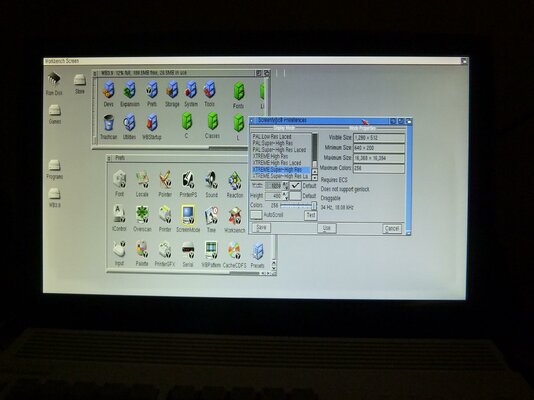
Its a Full HD TV Acer AT2358ML, I'm using Dvi to Vga adapter, hopefully be better when I get my HDMI adapter, the best screen I can get is on the Xtreme Super-High Res @1280 x 480 after that it starts to brake up or not supported (laced)

A wee Pic :)
 

Attachments

  • xtreme super-higjh res.jpg
    xtreme super-higjh res.jpg
    179.2 KB · Views: 10
I don't like it much.
Icons seem stretched out of proportion.
For 16:9 monitors best mode imho is HighGFX 1280x720 and on 4:3 ones... HighGFX 1024x768.
 
I have a question regarding this HighGFX thing you all talk about. Is it specific to the indivision or could it be used with the gbs arcade board and where do i get it from?

Thanks
 
Hi mfilos

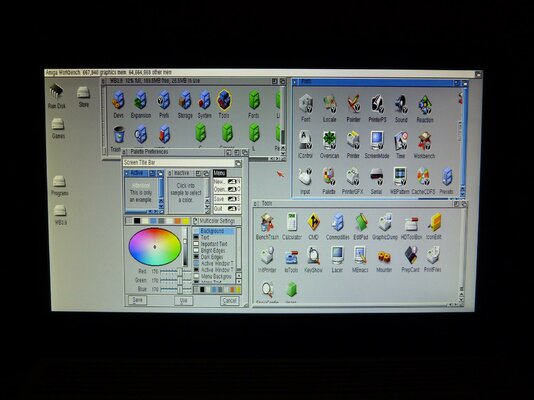
just changed it to 1280x720 and looks a lot better and its not braking-up

Cheers

Edit: after a bit it braking up and jumping all over with it on the Xtreme Super-high Res, Jens says over at EAB "Higher pixelclocks will be suppored with one of the next flash updates"

So will just have to make do for now
 

Attachments

  • 1280x720.jpg
    1280x720.jpg
    181.5 KB · Views: 3
Last edited:
@DonAmiga were you using that Tv before with your Amiga without Indi?

I really can't tell watching the photos. Is it a big difference now with it?
 
Hi mfilos

just changed it to 1280x720 and looks a lot better and its not braking-up

Cheers

Edit: after a bit it braking up and jumping all over with it on the Xtreme Super-high Res, Jens says over at EAB "Higher pixelclocks will be suppored with one of the next flash updates"

So will just have to make do for now

Very nice, is it fast with the ACA1230 in 64/256 colour?

---------- Post added at 10:06 ---------- Previous post was at 10:04 ----------

I have a question regarding this HighGFX thing you all talk about. Is it specific to the indivision or could it be used with the gbs arcade board and where do i get it from?

Thanks

AFAIK it only works with certain FF/SD's like the Indivision ECS/AGA - you can get it from Aminet:

http://uk.aminet.net/driver/moni/HighGFX40_6.readme
 
I have received my MK2 too but haven't used it so far. As a matter of fact, it was intended for my spare A1200 project with PPC and BVision and i am very disappointed to see it won't fit with the BVision.
So, do you think that replacing my MK1 from my main A1200 with the MK2 is worth the upgrade? Fortunately, i never had any socket problem with this MK1 and, as it is working fine, i am reluctant to change anything.
Would the HD720 16 colors mode be as fast as the 640*512 256 colors mode that i use for WB, IBrowse, etc?
 
Back
Top Bottom