Problems with PCMCIA & CF cards

  • Thread starter Thread starter slyder
  • Start date Start date
  • Replies Replies 13
  • Views Views 11415

slyder

New member
Joined
Jul 19, 2013
Posts
100
Country
Finland
Region
south
I've been trying to get a reasonably sized compact flash card to work as a transfer card via the PCMCIA slot/adapter of my A1200. To my frustration I've only managed to get a 32 MB Sandisk card to work and that is a bit too small for my use.

I' tried a 1.0 GB Transcend (80x speed) card and another 8.0 GB Transcend (133x speed) card but just cannot get them to work. Tried with different sized single partitions (32 MB, 1024 MB, 2048 MB). Both of them work as CF HD's via IDE.

When I format the 1.0 GB card on Windows 7 and then plug it into my Amiga I get nothing. Doing the same with the 8.0 GB card goes as far as getting a "CF0:NDOS" disk icon on the workbench.. The "PrepCard" program does seem to detect all these cards but if I try to run prepare on a card it says it is "write protected", even the working 32 MB one.

If I use "dd" on linux to dump an image of the 32 MB Sandisk card and then just dump that directly onto the 8.0 GB Transcend card the card seems to work occasionally but file operations on bigger files (>100K) seem to fail and freeze the OS.

Do these symptoms indicate that some device/driver etc. might perhaps need to be updated?

Am I correct in my understanding that a PC readable FAT32 card cannot be used via the IDE (I'm using a DUAL CF card adapter) bus due to different types of partition information used by the systems?
 
From my experience, CF through PCMCIA is very unreliable, I've had mixed results so far.
I think Transcend are known not to work on the PCMCIA, only through IDE (at least I was never able to get them to work).

The only brand I managed to use through PCMCIA is Sandisk, and even with them I've had some problems.
The lock-up problem you are describing happens to me all the time on my A1200 with BPPC.
When it doesnt lock-up, the files on the CF are usually corrupted (unless they're very very small).
I tried everything I can think of (and many suggestions from others) but eventually gave up on it.

Btw, the same card works flawlessly on an A1200 with 030 CPU, no corruption or lockups.
Might be a buggy driver, but there's only one that I'm aware of (cfd) and its not maintained anymore.
 
Get a CF packaged microdrive. Those can be got next for nothing.
 
Thanks for the replies. I'm hoping I could find some card at least 256 MB in size that would work reliably as the 32 MB Sandisk does.

Btw, the same card works flawlessly on an A1200 with 030 CPU, no corruption or lockups.
Might be a buggy driver, but there's only one that I'm aware of (cfd) and its not maintained anymore.

Could this what you mention be due to a too big "max transfer" value set during installation of the disk/partition? I noticed that people report getting CRC errors and the value should be set to 0x1fe00 to avoid problems.

Get a CF packaged microdrive. Those can be got next for nothing.

Are these known to mostly work via PCMCIA? I need to look into these...
 
I think Transcend are known not to work on the PCMCIA, only through IDE (at least I was never able to get them to work).

I have a 4GB Transcend x133 works fine

Had Kingston/Maxell 4GB cards that only work with IDE
 
It is odd that these cards seem to work somewhat randomly..

I've ordered an SD to CF adapter, hopefully that will be arriving sometime next week. I'll report my results here..
 
Do these symptoms indicate that some device/driver etc. might perhaps need to be updated?
They might, as latest versions have better compatibility. Make sure you are running v1.27 of compactflash.device.
Type 'version compactflash.device' in dos/shell to see which version is loaded. Also type 'version fat95' to check that it is a recent version ( 3.17/3.18 ).

Also, if you ever get CF0:NDOS, do a quick format on the amiga! FAT95 is more picky on MBR/FAT variants than Windows.

For info, CF card capacity or speed ratings are not factors affecting compatibility with the amiga in themselves (although many seem to think so).
The CFD driver supports drives up to 2TeraByte (TD64), and all CF cards should work in the slower modes supported by the amiga.
CF cards are complex, and work in totally different modes for IDE and PCMCIA operation. Some cards deviate from CF specifications, and compactflash.device is also not perfect.
As people have mentioned it seems most SanDisk cards work well. I've tested lots of different cards successfully, also transcend cards.

You mentioned the maxtransfer issue. This is also no factor at all in this scenario, as it is a bug of scsi.device, the a600/1200/4000 IDE driver.

Am I correct in my understanding that a PC readable FAT32 card cannot be used via the IDE (I'm using a DUAL CF card adapter) bus due to different types of partition information used by the systems?

It is possible but uncommon to use FAT format on the internal IDE.

I don't have experience with dual CF adapters, but I've read that several people have trouble with them.
If you have a normal single CF adapter, I'd try the cards on it as well. If not, make sure you are using a setup (one/two cards, port #1/2, master/slave, etc) for the adapter that you know works with the 32mb card.

Finally, the SD to CF adapter route could work, but then it's the adapter that does the tricky parts. Chances are if one SD card works or fails in that adapter, other will as well.
And make sure you check what sort of SD cards the adapter supports, it needs SDHC support for cards above 2GB. There are also cheap SD-PCMCIA adapters that work well for 2GB cards, but you need to use a 16bit PCMCIA adapter, not a 32bit cardbus one.

Good luck :)
 
Mmm... "version compactflash.device" says 1.21 and "version fat95" says object not found... That might be a bit of an issue I suppose :)

I'll get me coat and be on my way to Aminet ;)

---------- Post added at 01:18 ---------- Previous post was at 00:47 ----------

Awesome! Updating compactflash.device did the trick. Now my 8 GB Transcend works with a full 8 GB partition. Don't know if the size of the partition is ok for the filesystem but detection and operation seems to work perfectly.

The OS image I'm running from the IDE CF is "Bloodwych Classic Workbench v25" (www.abime.net) and it came with the A1200 that I purchased. Apparently it has some old drivers. I thought it had everything updated but apparently not...

Thanks Frodegh :thumbsup:
 
Awesome! Updating compactflash.device did the trick. Now my 8 GB Transcend works with a full 8 GB partition. Don't know if the size of the partition is ok for the filesystem but detection and operation seems to work perfectly.

Cool, I'm glad it worked out for you.
Both FAT95 and CFD have proper 64bit support so no problems with drive or partition sizes there.
 
I've ordered an SD to CF adapter, hopefully that will be arriving sometime next week. I'll report my results here..

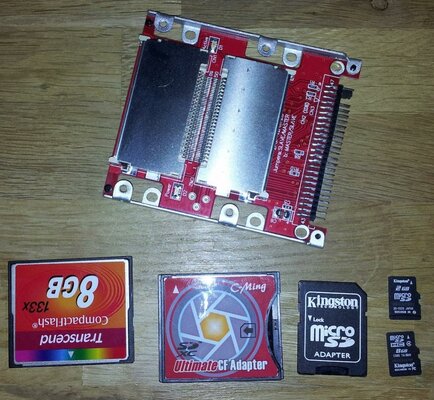
It took a bit longer than I thought for this SD-to-CF adapter to arrive. Nevertheless it works fine with the A1200 via the PCMCIA slot, I had to pry off the cover of one of my CF-to-PCMCIA adapters as the new SD-to-CF adapter is thicker than a regular CF card. Haven't tried it in the IDE bus though but I'd be surprised if it didn't work.

Here's a snapshot attached of my cards and adapters that are all working in my setup. I also included my dual CF IDE adapter in the pic (got two of those and one is inside the Amiga with a 4 GB Transcend CF card).

One happy camper over here as everything is working flawlessly :)
 

Attachments

  • kortit.jpg
    kortit.jpg
    182 KB · Views: 30
Tested sandisk 128GB compact flash via FastATA & PCMCIA slot. Formatted in both slots and seems to work ok,but total available shows 119GB, ie 119GB of data,but should it not be showing 128GB total in the advance menu where you can see firmware? OS4.1
 
119GB instead of 128GB is absolutely normal since, once formatted, the filesystem reserves some disk space for its own purposes and also because the size is declared as if it was "decimal" instead of "binary".

1 "decimal" GB = 1 000 000 000 bytes
1 "binary" GB = 1024*1024*1024 = 1 073 741 824 bytes

So, 128GB are: 128 000 000 000 (decimal) / 1 073 741 824 = 119.209289551

Hope this helps!
Bye, liviux76
 
It was already showing 119GB before it was even set-up not even formatted. After setting it up and formatting it still showed 119GB of storage space. Pre-formatted already I assume. Will do some more testing in PCMCIA slot,so far not a single problem.
 
Back
Top Bottom