A2Pi

  • Thread starter Thread starter Charlie
  • Start date Start date
  • Replies Replies 151
  • Views Views 31229
Thats so odd. I dont know what i'm doing differently.

which pi are you using please, a pi 2/3 /zero /zero w?

probably best to write a floppy on your apple via atdpro (serial card or over audio etc)


It's because you are being cheap as usual and using a Pi Zero lol

;)

You made me laugh Bas! :lol:

@danielj:
Nice to hear from you, your project, eh? Excellent! I really must stick my nose in at *. it's been ages.
On the A2Pi front I can claim no cleverness at all, the design + software is down to Dave Schmenk, I just grabbed his published specs an rolled my own version of the interface board... I did intend to use something other than a 6551 (a bit old) but in all honesty ran out of talent at that point so just stuck with 'traditional'.
Entirely from memory:
A2Pi uses 5 GPIO lines: 5v & GND, and IN, OUT, CLOCK, for the serial communication with the 6551 (also a couple of resistors for level conversion) It works remarkably well with an absolute minimum of hardware, hat's off to him. If I hadn't run out of talent I was hoping to drive the serial communication faster with with the help of newer hardware, or use more GPIO pins for a parallel connection - one of the many very good things about A2Pi is it auto-magically mounts your physical drives on the Pi and provides virtual drives for the Apple II... the down side is that serial link can be a bit slow when opening a FDD with lots of files or an HDD.
If I can be of any assistance I'd be most pleased, but I suspect you know far more about this stuff than me. If I had my way I'd be happy with a faster connection and if at all possible the client code going in to ROM so a bare Apple II would just work. If you are inclined to add an A2Pi header to your board that would be excellent, TBH the only trick, if going with a 6551, is to be sure you think carefully where you put the header or routing cables to the Pi can be impossible:
-The official board has the GPIO at the top with the Pi mounted face-down, with just enough room in front of the Apple bus socket to get a HDMI adapter in there.
-Mine has the GPIO right next to the Apple bus slot and the Pi mounted the other way up primarily because it meant a smaller / cheaper PCB...further up this thread is a GPIO adapter for my board to mount the Pi further away from other cards. I suspect mounting a Pi on the keyboard end of a Superserial design might be the best plan for space.

PS:
Another option might be to dispense with a traditional Pi completely and instead include a socket for a Pi compute module. I did some preliminary Eagle files for that further up this thread that you would be very welcome to... More complication, and would very likely will push up the price of a finished board quite a bit compared to just including a few GPIO pins... but a Super Serial board with the option to plug in a compute module would be very cool and with all those lines open up a world of further options.


- - - Updated - - -

...

Whats the easiest way to get the startup.txt to a disk image? I see Charlie mentioned Ciderpress, I will download it and play with it. Is that Going the right direction?

THANKS

Glad it's working for someone other than me ;-)
The most helpful thing would be for me to put up a disk image with my changes on it. I've been a bit reluctant to do so because I don't want to go treading on DS's toes flinging about rogue versions of his software...
For now CiderPress is your (very unintuitive) friend. In a nut-shell: Take the v1.6.po image, load up in CiderPress, delete the STARTUP.BAS file, and import my start.txt being sure to inform CiderPress it's a BASIC file.

If you look as what I did to DS's code you can see I wasn't at all tidy - just slammed in a bunch of code to (IMO) pretty-up the screens a bit - absolutely nil added on the functionality front... Having said that, once I get a better hang of AppleSoft BASIC, I'm intending to add the A2CLOUD client to the disk for those who might want it - I added A2CLOUD support in to 'my' version of the A2PiOS with that in mind.
 
Last edited:
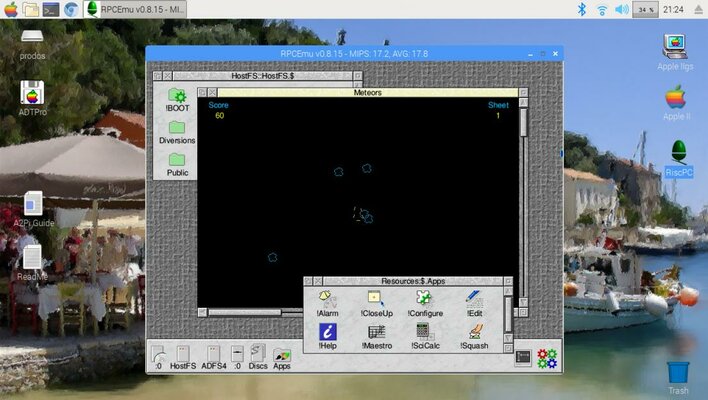
I've been doing some further tinkering with 'my' version of A2PiOS. (shudder... Linux)
-Dumped a bunch of stuff I couldn't see a use for to free up some space (about 1.5gb!)
-Added a RiscOS* emulator: rcpemu...
...for those who haven't known me a while RiscOS based machines are, believe it or not, is my main retro computer interest. For now It's just a basic OS 4.39 install that runs from an icon on the Linux desktop. I'll likely integrate it in to Emulationstation when I've recovered from building it from source.

If anyone's interested let me know and I'll put this update on DropBox.
screenie.jpg
-screenie-

*IMO: Acorn built some awesome computers back in the day and anyone who thinks RiscOS isn't the best OS ever made needs their head examining, so there! RiscOS will run very well natively on a Raspberry Pi (far, far, better than cruddy old Linux) but as A2Pi and RetroPie need Linux what can you do..?

PS
In case it's not obvious I don't like Linux one little bit!
 
Last edited:
Charlie why do you not like linux ?

Jamie.

To be fair I'm trolling a little bit, and also to be fair a lot of it comes down to Linux's 'ethos' being alien to the way I want / expect an OS to behave which makes it very hard for me to get along with it happily. That's not necessarily the OS's fault but as I'm knocking on a bit I've had a good many years to develop a healthy loathing for all forms of that OS. Besides I'm nearly 50; time served means I'm getting to be a grumpy old man.

Examples? Ok, just a few...
-It's a 'modern' main-stream OS, yes? So why am I regularly forced to start banging away at the command line, for what are generally wholly avoidable reasons, when using a modern paradigm like a GUI ?
-SUDO is just Linux's "passive-aggressive" version of 'please'... It's an OS, and so I expect it to do what I want when / as I want it, but instead it behaves like a child who has just learned it doesn't have to do anything if it insists on being asked politely before it will consider doing anything at all.
-It's very fragmented, which means if you want to do / change anything even remotely beyond where to place an icon you'll have a devil of a job finding / remembering where that darn config file is kept / how to alter it / and what specific expectations that file has... oh, and 'please' will probably be required, but only after you've lost your changes because you didn't say 'please' first.
-On a related subject one keeps coming across usability issues that a 'modern' OS just shouldn't have in this day and age. eg: "I want to put a 'short-cut' on the desktop"...yep, good luck with that one unless you know the OS, and the specific GUI you're using very well.
-There's a seeming endless list of usability gripes but the previous comment brings me to the issue which is the real killer for me; information. Ok, I don't like how Linux is made / behaves but with information I can learn to get along with it (that's backwards for how an OS should be, by the way). Even after so many years my daily Linux experience almost always ends with the following:
a) How the *&%$ do you do such-and-such? (shouldn't a well constructed OS strive to make things obvious?)
b) Look it up on line
c) Discover that in very nearly every case:
i) You find there are no straight-forward instructions for anything, a question about one thing recursively becomes further questions about what the answer means, if you can find an answer.
ii) Too many 'answers' turn out to be variations on the theme 'RTFM', which is never helpful no-matter how politely put, and...
iii) ...any actual documentation is written in such a way as to be opaque to the understanding of anyone who is not already thoroughly familiar with the issue at hand. It's all poorly annotated and indexed reference, not educational, material.
iv) If patience hasn't already worn too thin by this point one finds that the solution is often needlessly complicated to the point where one stops being bothered (eg: shortcuts as a trivial example)

Compare that to another 'main-stream' OS:
How do you do such-and-such?
i) Do a quick search.
ii) Find multiple 'how-to's' which are invariably step-by-step guides with clear examples.
iii) Quickly sort the issue, satisfied in the knowledge that something has been achieved / learned.
iv) Maybe go look in to the subject in more detail out of un-thwarted curiosity.
Oh, and chances are you find yourself doing so far less because said OS has been written to function as clearly, consistently, and obviously, as possible. Except where M$ (darn them) have deliberately tried to hide something.

In a nut-shell Linux suffers from two fundamental issues:
-It's ethos is UNIX-based - not a good thing IMO, but that's just a point of view. Android and MacOS are too but Google and Apple have gone a long way toward making their versions friendly and accessible while still having a powerful command-line when required.
-More importantly it's a perfect example of both the best and worst in open source development: It's free and does the job, but without something at the helm guiding development, direction and consistency go out of the window while usability issues are left in the hands of those banging the metal... the latter is never a good thing if you don't want the end-user to curse you.


Wow, sorry. I can get a bit wordy at times. I had intended my reply to your perfectly reasonable question to be the first paragraph of this lengthy tirade. Obviously lots of people swear by Linux, but I suspect far more swear at it.
 
Last edited:
..ahh, Hamsters: The greatest platform game ever invented, and if there's no other reason to have a RiscOS emulator running that's good enough for me!
Options:
-Buckets of Blood
-Maximum Wibble
-Music and Sound effects

Now let's how long it takes before you have a seizure. :-D

... ... ... Apple II thread returning shortly,
 
Hullo! :)

I'm gradually gathering pieces for the serial project - I have both CPLD and microcontroller boards now, and will at least mock up the low level comms. In so far as putting the A2PI code into ROM, I've had a ponder about how to do this... How large is the code, is it built to run from C800? If so, we could in theory rig up the new card to detect when a Pi is plugged in to it (or turned on) and download the relevant ROM into sideways RAM. I suspect that, however, the timings might not quite work for this. Anyway, one thing at a time! :) I can certainly provide the relevant headers.

d.
 
Lovely!

On the subject of A2Pi in ROM, that of course would be fantastic. But just having a GPIO header, or a subset for A2Pi use, would be wonderful. I'm not much for coding but will have a look and see how it's loaded / addressed.

You're going the CPLD route? FWIW: Again I suspect a far better plan than using a bunch of elderly 6551's and maybe that could lead to squeezing some more performance out of the interface? A bit beyond me, I have to admit.

Are you aware of this? http://john.ccac.rwth-aachen.de:8000/patrick/data/Ser-Par.pdf
...it's a design for a 3in1 I/O card with SuperSerial compatability that may (or may not!) help with ideas. To quote the designer:
[FONT=&quot]This is one of my own designs, a [/FONT]Serial/Parallel/DataLink interface[FONT=&quot] card. It features an EPSON-compatible printer port, two RS-232 interfaces and a syncronous interface called DataLink I used to control my [/FONT]Märklin[FONT=&quot] model railway. Eight slots are not enought when you are really interested in hardware, so around 1990 I combined these three separate cards into one. One of the 6551 ACIAs uses the same adress space as the SSC, so that software written for that card (including ADT) could be used.[/FONT]

I really should make a visit to *. It's been quite a while... I suspect there's very little I can do to help, I know you know far more about this kind of stuff than I ever will. But I'm most interested in your progress and if by some chance I can help, so much the better. (It may be no more than practicable advice as to GPIO header placement as I've played that game already)
 
Never let if be said I'm not prepared to flog a dead horse, so here's some more flogging:

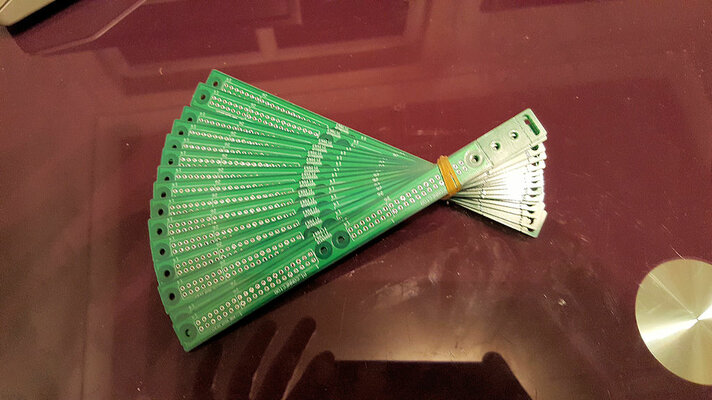
Fan.jpg
I'm a 'fan' of Seeed

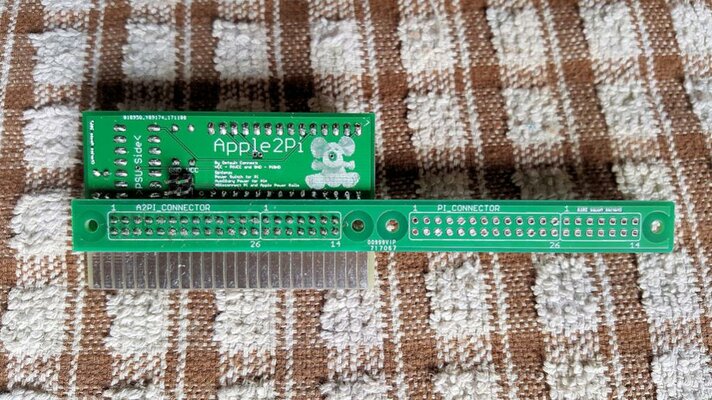
My latest batch of PCB's has arrived. I'm pleased to say Seeed have done another excellent job. What are they for? Oh, they are GPIO extenders, primarily to allow a Pi to be mounted nearer the Apple II keyboard, so making things a little less tight. The PCB's even come with some snappable sections at the end to act as spacers, reinforcers, or an adjustable foot to support the Pi end if required - I've not needed any of these myself.


Joined Front.jpg
Pi and A2Pi forever joined

The idea is to allow options. Got a Pi Zero, or not bothered about space? Just mount the Pi direct to the A2Pi board. But if the computer is full of cards my little do-hickey will result in a more Apple II-esque form-factor. Socket or solder front or back; it's all good. In my case I elected to solder the board to the back of the Pi, so leaving the GPIO fully free, and replace the socket on my A2Pi with the extender soldered in place... a bit nerve-wracking as it seem's I'm using my last A2Pi board until I have a reason to order more. It would be typical if I FUBAR'd it.

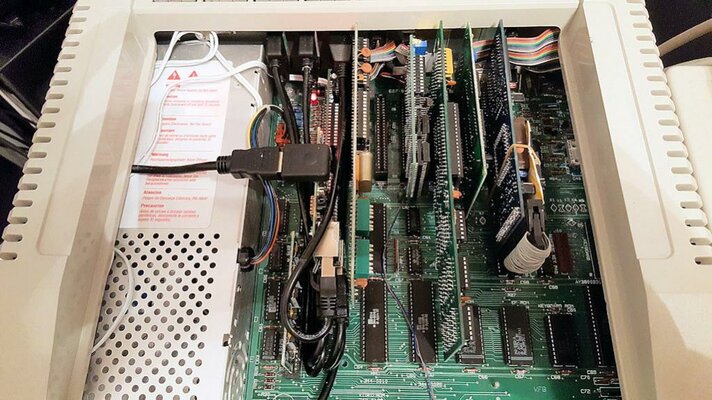
Installed.jpg
That looks a little more normal

Here my A2Pi+Pi3 is still mounted in slot 1. The mounting is good, the extension cables still reach the ports on the Pi, and there's much more clearance all round... microSD card more easily accessable and no issues with either the 80 column card to the left or the Super Serial card to the right. I think I'd call that a success.

*Edit*
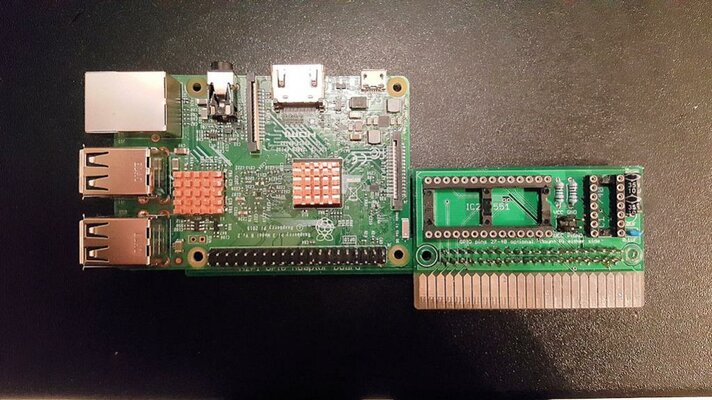
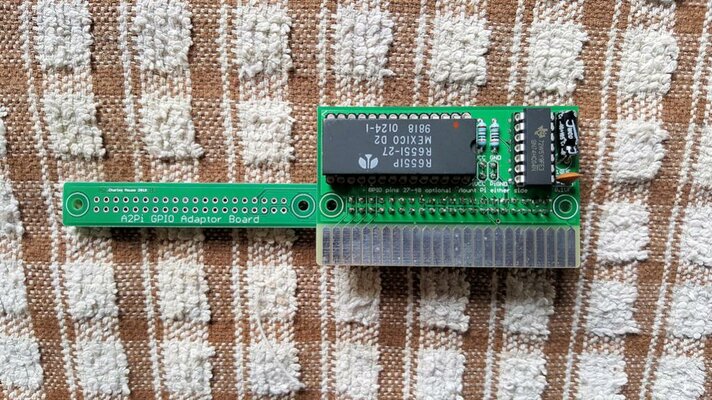
It turns out I had a bunch of my v2 A2Pi boards squirreled away so here's a couple more piccies of a freshly made one, with GPIO adaptor attached:

A2PiAdaptorFront.jpgA2PiAdaptorBack.jpg
Fresh as a New Day

 
Last edited:
very good charlie

btw

have you tried any other emulator front ends /packages for the pi.

such as:
http://chameleon.enging.com/emulators - I'm just playing with this, it hasnt got reropie shader support but seems quite snappy. i've tried it so far on a pi3, its a bit slow booting (hasnt completed yet after 3 mins) on a pi zero. maybe it wont!

have you tried lakka?

I'm only playing, but if theres a quick boot option that will for me at least cover the basic emu's there may be other options to retropie/ES
 
Thanks :-)

I really must look in to other options. So far I've only used RetroPie, mostly because Linux makes me swear every time I have to fiddle with it. Having said that my IIe will now do a passable impression of a RiscPC (hurrah!) I'm trying to work up the courage to see if I can get a Beeb emulator compiled and running under RetroPie - a horrific oversight IMO.

Would it be of interest if I uploaded a copy of 'my' latest image..?
 
not for now, ta, i'l cook one of the other distro's up for the pi zero in the next weeks - I'll nick some details off you if ok near the time :)

retropie is hard to beat..

re bbc, I wondered also. there were some bbc posts on retropie, in linux bbebem I think, someone also suggested running it on a pi under riscos:)
 
Last edited:
Yes, as it happens the available RiscOS BBC emulators are really good and along with running RiscOS natively on the Pi I've also got RPCEmu running nicely on my install. Still without Linux (urgh!) I have no A2Pi and it kind-of offends me to run an emulator inside an emulator for any reason but geekery...

I couldn't get B-Em to compile successfully for Raspbian, a real shame as there are *NIX sources and Tom Walker is not just a fine chap but a very fine coder too... so I went ahead and compiled BBCEmu. Running, but it's quite flaky (especially in the sound department) and it is quite the resource hog. A shame as the Windows version is really rather good. I figured out how to get it to run from Emulationstation, and made some graphics for it's entry, but I have run in to a further issue:
I guess as it uses a serial link A2Pi doesn't really support multiple key-presses on the Apple II keyboard which rather makes playing games other than Snapper impossible without a joystick. Sadly I can't for the life of me work out how to integrate Emulationstation's joystick support with non-standard emulators. I don't suppose you know?

On a side note it's funny to think a BBC computer inspired product like the Pi doesn't have a good BBC emulator for either it's most prominent OS (Linux) or it's most prominent emulation solution.
 
Back
Top Bottom