A2Pi

  • Thread starter Thread starter Charlie
  • Start date Start date
  • Replies Replies 151
  • Views Views 31230
good luck! unfortunately some boards require slot 0, mine only has slot 7 free i think. what a pain. Darn 1mhz electronics eh :)

Yep!
It's just as well I don't do this for a living. Can you imagine how much trouble I'd have in the Ghz range? :blink:

...Bead of hot glue over the exposed ends of the GPIO pins on both Pi and a2pi board, then cover said beads with kitchen foil and: The link works much more reliably in any slot, so proving my theory, but it still only works about 1/2 of the time, BLAST! I guess that makes another pile of coasters as the only other thing must be interference on the 6551s data lines going between the GPIO pins. Putting the GPIO at the other end off the board will make the whole thing too tall to get the lid on.


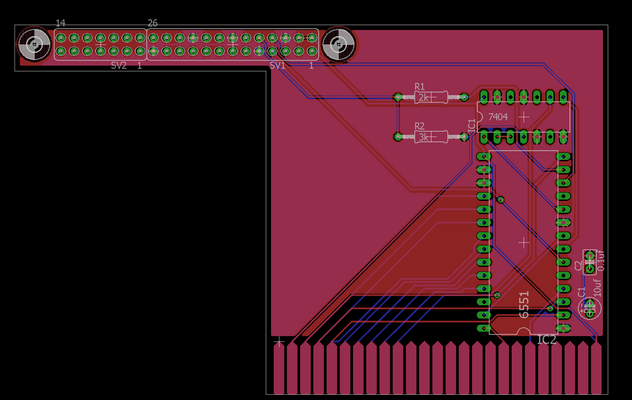
Ok, on to a v5 board design. This one should work with any GPIO equipped Pi but for the Pi3 (power draw / software) and being the same layout as the hand-wired version should work... carefully measured to be sure a 90deg HDMI adaptor has room regardless of slot.

There's just one problem:
PiV5.png
It huts my eyes!

But what to do? Having measured very carefully I don't see another option without resorting to a ribbon connector which will leave the Pi flopping loose inside the case...
I could make it a little less offensively ugly, stronger and cheaper too, by moving the GPIO connector inboard but it would then only fit in slot 7 because of clearance for the HDMI connector. Thoughts..?
 
Last edited:
how did the schmenk guy get round the issue? worth asking him?

does the A2pi software work on a pi zero? is that more simply relocatable as so small? Hang the thing off a ribbon while you test it, no one would care if a pi had to be velcro'ed somehere in the case. Though a ribbon might introduce other problems could that also reduce the problems you're seeing right now?

just random thoughts. I have no idea what I'm talking about.
 
how did the schmenk guy get round the issue? worth asking him?

does the A2pi software work on a pi zero? is that more simply relocatable as so small? Hang the thing off a ribbon while you test it, no one would care if a pi had to be velcro'ed somehere in the case. Though a ribbon might introduce other problems could that also reduce the problems you're seeing right now?

just random thoughts. I have no idea what I'm talking about.

All perfectly reasonable thoughts...
Out of sheer stubbornness I want to do a board that will work with any compatible Pi, especially as I suspect there's lots of unloved Pis about looking for a purpose. A board specifically for the Pi Zero would be a doddle and a very neat solution, it's coming...
Something far cheaper than the $89.00 the now out of stock official interface board cost is also a goal. That board will only work with an early 26pin GPIO Pi and fit in an Apple II slot, newer Pis have their GPIO and HDMI in somewhat more awkward positions for this purpose.
Yes, there's nothing to stop you using a ribbon cable between the board and the Pi (the serial connection won't mind quite a bit of extra length) but that means the Pi either being external, or mounted near the front of the Apple II which then means very long USB and HDMI cables to run out the back. Not a problem as such I admit. With a ribbon connector in the mix you end up taking up more than one slot unless slot 7 is used...

...which brings up my thought on a "least ugly" solution. The very ugly design can accommodate any Pi and fit any slot. If I said "only slot 7 unless you use a Pi Zero" I could do something much neater. I'd appreciate your opinion on whether that's a reasonable trade-off?

PS
I have 1/2 an eye on making sure this will fit in a IIgs... Apart from trying to be useful to as many as possible I've seen cleaver people produce near instant booting versions of Linux for the Pi. That would make for one hell of a good alternate to a IIgs accelerator.
 
Charlie

Can you please go back to your v3 board and preferred setup..
Reduce the value of the resistors to 1K and strap a 0.1 decoupler accross the 74LS supply pins.

If you have a scope please try measuring the Amplitude of the signals going to the GPIO first :)
 
Ha, one of my suggestions ( before I deleted it) was ask bas. With the BBC matchbox co pro that needed some decoupling capacities added. And bas replies;)

i dont know of any slot 7 specific cards except a second disk controller (maybe) . I do know of specific slot 1,2, 4,6 cards so slot 7 seems a pretty good choice!

and when I was looking for a pi model b...I had quite a hard time finding one! They aren't as easy to buy as thought.

pi zeros are cheap as chips...1/6th the price of a 3.


Does a2pi software run on bare metal or can you vnc into the machine? If so I'd not use a hdmi monitor tbh.
 
Ahh, Bas to the rescue :-)

Many thanks old chap, I shall try your suggestions tomorrow. I really don't want to depart from the v3 if it can be made to work.


The software is basically just Raspbian with some extra stuff written by people much more knowlegable than me. So it can do whatever you want, eventually I'll put a bunch of other emulators on for a thoroughly versatile machine.
I did try to use one of the custom faster booting distros based on raspbian and manually add the packages but couldn't get it to work. There's just something about Linux I've never been able to get my head round...
 
Hmm,
I think no more playing until I get some more R6551Ps... I wonder if after-all the one I've got is a bit suspect.

I've tried adding caps across both ICs, 1k resistors instead of the 2 and 3k ones, substituted LS for HC logic just in case. I've also done a version with the unused pins in the GPIO header removed in case they are acting like little aerials around the R6551Ps I/O lines... even backed the board with foil in case the ICs on the Pi are a bit noisy... I even went as far as a minimal version without any caps at all, and every combination of the above I can think of. All changes seem to make no difference, sadly.

When the Pi boots the driver software on the Apple finds it or not, usually not but when it does work there are no communication issues at all. I can reboot the Pi and all remains good with communication re-established every time, but if I power cycle the Apple it's back to fingers crossed. Used or rested it doesn't seem to matter at the Apple's end. I wondered if it might be a power issue but both systems seem individually stable and the Pi isn't complaining about too little current.

As a sanity check I put my R6551P back in my, until now, totally reliable hand-wired board and guess what? Yep, that's acting up too.

Suggestions are very welcome but I guess I need to wait on my replacement R6551Ps
 
Last edited:
If the pi is booted first while the apple is off, and then boot the apple it's still hit or
miss if it will connect over serial?

If you then control break the apple, is the pi still running but still won't connect?

Do you want to borrow a pi or an alternative 6551 ( if I have one, what machine can I borrow one from..)?
 
Fair thoughts...
To clarify: The Pi gets it's power from the Apple bus, so starts as soon as the Apple is powered up. I can't directly change the Pi's power state while the Apple is on, but having said that the Pi always boots fine (so does the Apple). If communication between the two after a power up of the Apple is good it's always reliable regardless of what I do with the Pi, including a reboot... I've not tried a warm reset of the Apple yet, I shall do.

I assume both Pi and Apple are fine, but something on the interface card is only starting properly every now and then on power up (R6551P?) but once it is started is quite reliable... I guess your suggestion of doing a warm reboot with confirm or deny this theory.

On the subject of lending me parts to try that's most kind but I have a few Pis and R6551Ps in the post so I won't ask to put you to the trouble, but thanks!
 
Last edited:
Ahhh,
Thanks...a thought occurs. I might just add a cap & resistor to the board to slow the speed it power's up. Years back I had a little memory accelerator do-dad for my A3000 that was a SOB to get working until I realised the computer needed a mo' to stabilise before the circuitry kicked in... I'm hoping it's just a dodgy R6551P IC and swapping it for another when they arrive will sort it, but until then I want it working reliably enough to actually use my machine.

I'm still a total n00b when it comes to Apple IIs and I may be in danger of repeating what I did when I got an Atari XL: Jumped right in to the hardware to the point where I actually had a 6502c replacement board I made running in it and to this day have hardly played with it. (Yoomp! aside which I seem to be addicted to)
 

:thumbsup::cool::DSUCCESS:D:cool::thumbsup:


The 'new' R6551Ps I ordered have just arrived so I banged one in to one of my v3 boards, powered up and...


SUCCESS

Ok, ok let's not get too excited, reboot the Pi and...

:thumbsup:SUCCESS:thumbsup:

Hmm, I've been here before. Let' just leave it on for a bit, power the Apple II off and power on...

:thumbsup::cool:SUCCESS:cool::thumbsup:

Right, just for the sake of paranoia I'll leave it on for a bit, leave it off for a bit, then try again...

Yep
:picardFAILURE:picard


Aha! Actually it was...
:thumbsup::cool::DSUCCESS:D:cool::thumbsup:
Had you going there for a minute?


So there you go, all that messing about for the sake of a dodgy IC. And the lesson of this story is... Don't fiddle with old electronics if you're not prepared to... stuff.

Good, now I can get on and start playing with my new toys. Um, I might even send off one of my Mockingboard designs to Seeed for fabrication.


PS
Can anyone render some Linux advice?
Currently my Apple BEEPS when it connects to the Pi, so I know when to login: I then have two options...

Type 'apple2 <RETURN>' and the system goes directly to Apple IIgs mode in full screen.

Type 'Pi <RETURN>' and 'apple2 <RETURN>' and the system goes to the Linux command line. I can then 'startx' if I want.

...what I would prefer is to hit a key (maybe a) to go direct to the IIgs mode or another key (maybe p) to go to the Linux command line. Maybe 'x' too get to the x desktop, but not essential.

How do I change the Linux login: process to allow this, or similar?

Oh, and:
This system shows up on my network as 'raspberrypi' which really ticks me off. Is there a way to get it to show up as something more relevant like 'apple2'..?
 
Last edited:
very cool!

sudo nano /etc/hostname (I think)

can someone help charlie with a bit of bash script or advise some other way to help?


does the iigs mode output over the pi's composite btw? so you can pretend its a iigs, with a virtual hard drive(?), to the same CRT monitor?

cheers!
 
Thanks Iain,
I shall go try that. On the subject of composite out I've not tried but I expect it would work, if I remember correctly there's an option in the Pi's config.txt file to do just that. I went the HDMI route as it was the default option, but composite would give a more 'authentic' result, and with a bit of jiggery-pokery could result in a switchable output to a monitor.
 
A2Pi V3 Photos

A2Pi V3 Photos

A2Pi V3 Photos:

I thought it might be nice to show some options now I actually have the darn thing running. First the populated board itself:
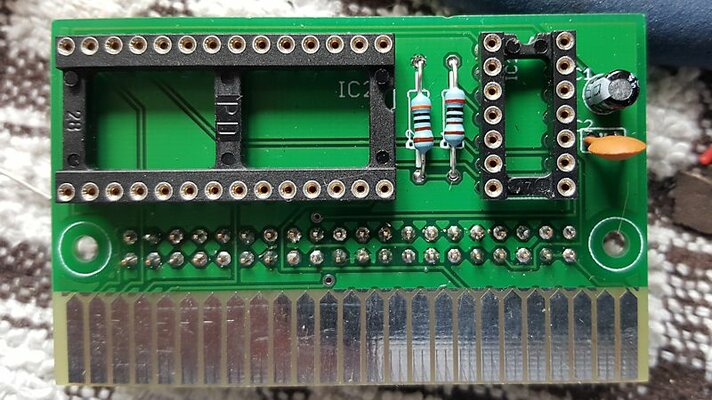
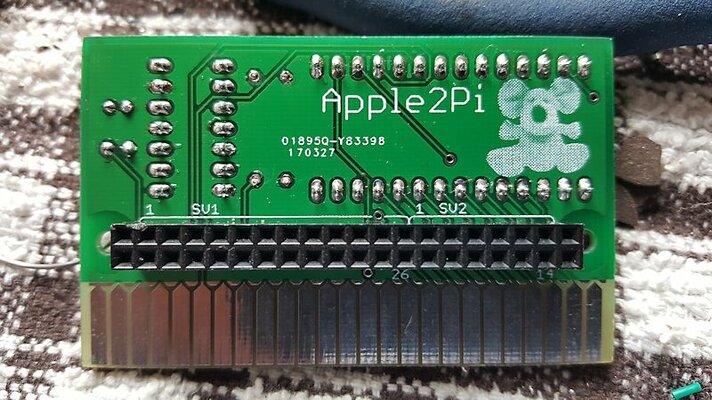
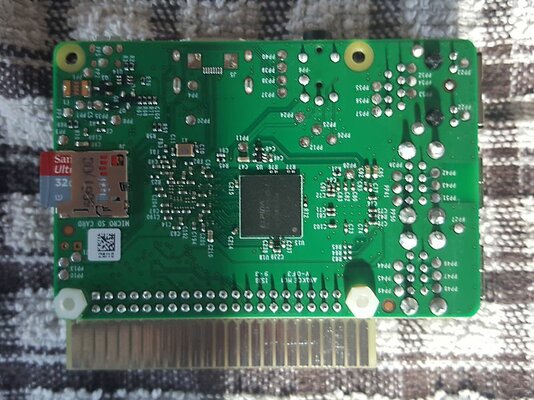
a2piv3 front.jpga2piv3 back.jpg
Back and Front
I hope anyone interested will agree it's a neat enough little board... I'm especially pleased with my new logo, I used a half tone printing technique to get a little something interesting out of the PCB fab process. This board is populated with a couple of power rail smoothing caps but as long as you use a good R65511P they shouldn't be needed for stability. On that subject one can also solder some smoothing caps across both ICs power pins, but again optional.

I've tried to make this board as flexible in set up as possible. Below I've attached a Pi Zero via a plug in header:
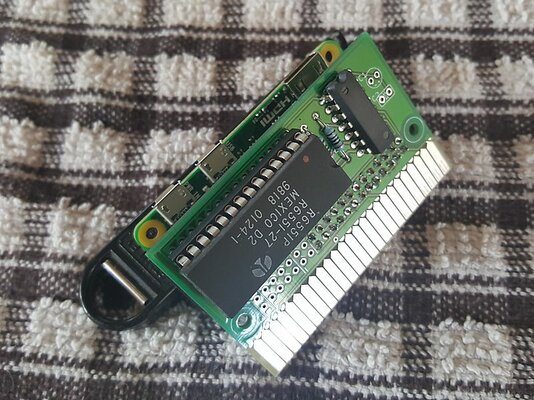
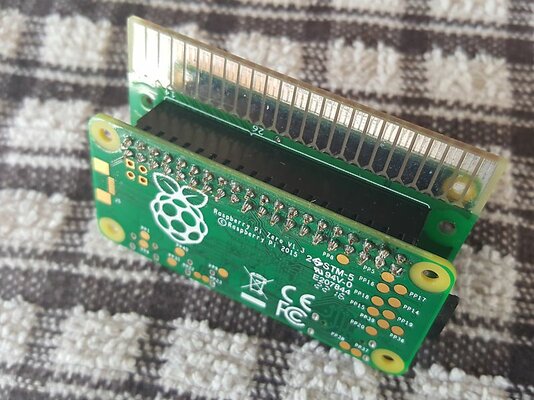
A2PiZero Front.jpgA2PiZero Back.jpg
A2Pi Zero Front and Back
(This one's Iain's)​

There's nothing to prevent the board from being soldered directly to the Pi's GPIO pins for a more secure connection. This will also give a little extra clearance for any card in a lower numbered slot, especially if using a Pi Zero as it's so flat the two boards can be mounted very close to each other. For video I'd go for a miniHDMI to HDMI panel adaptor lead to the back of the Apple II as that will carry sound too, but composite output is doable too for greater 'authenticity'. For USB out with the Zero I'd suggest a small miniUSB to USB hub attached on top of the Apple's PSU behind the knock-out. My Apple IIe Platinum has RFI shielding painted inside, so if using WiFi a USB dongle to the outside will be needed.

Below is the Pi 2 set up. This time with both boards soldered together:
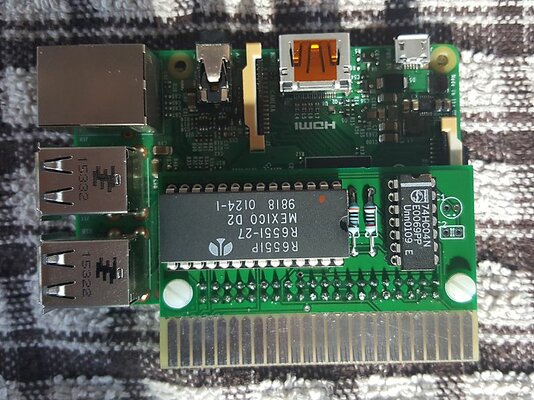
A2Pi2 Front.jpgA2Pi2 Back.jpg
A2Pi 2 Front and Back
(This one's mine)

Set up for an A2Pi 2 is much the same as the Zero but full size panel adaptor leads can be used for USB and HDMI, RJ45 Ethernet too if wished. It should be noted there isn't a whole lot of clearance for the Pi 2's HDMI port once the Apple's lid is back on so a 90deg or 270deg HDMI adaptor will be needed, the smaller the better!

Here's a close up of the soldered attachment of the two boards on my A2Pi2:
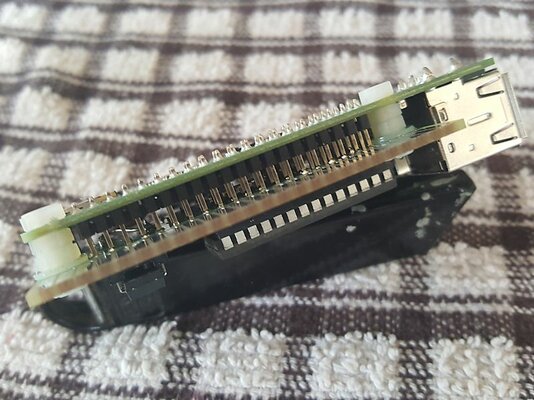

A2Pi2 Soldered.jpg
Soldered and Bolted

Maybe soldering plus nuts & bolts is overkill, but useful to get alignment right before soldering. Still, useful extra support if the boards are to be socketed together.
One final point is that this board has been made to fit earlier 26pin GPIO Pi's too with the use of a shorter socket. On the down side the holes for nuts & bolts won't line up but on the up side how may unloved old Pi's must be knocking about? Also older Pi's have a separate composite connector. The only Pi with proper GPIO that won't work is the Pi 3. Too much strain on the Apple's PSU and power rails and the software itself is reported incompatible.

Right, I'm going to go and actually have a play with my computer at long last. :D

PS
Here's the Eagle files for the A2Pi v4 board. Functionally the same as v3, above, but the schematic is hopefully easier to follow and the board hopefully improved in a couple of areas:

 
Last edited:
Awesome work with the cards, Charlie!
 
:)
I'm flattered. Thanks for the kind comments chaps.

PS
A couple of images of my setup running:
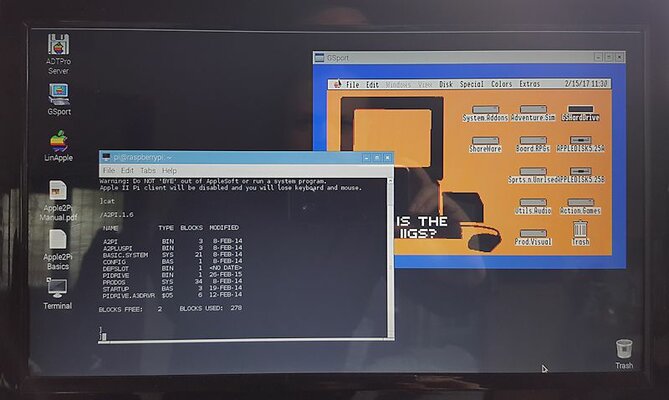
A2Pi Desktop.jpg
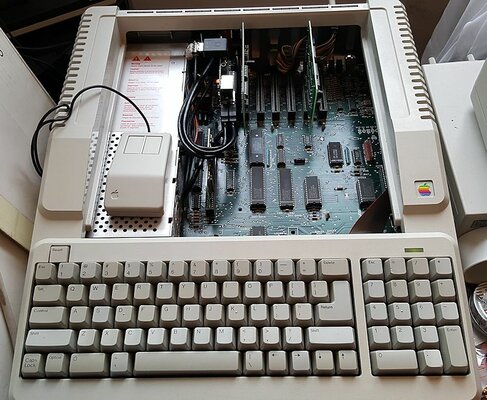
A2Pi Apple IIe.jpg

The Linux desktop has GSport running and a teminal window in to the Apple II... I could have a full screen gs mode too. A2Pi in slot 1, note the 90deg HDMI adaptor so I can get the lid on. Ooo, so many empty slots...
My trapezoid mouse modded to optical, USB, and two buttons, now Retr0Brighted... Ahh, that's better. Modded as I don't have an Apple II mouse and two buttons are helpful in Linux.
 
Last edited:
Ooh, I'd love to get one of those IIe Platinums.
 
Ooh, I'd love to get one of those IIe Platinums.

I've been resisting getting any kind of Apple product for years... having said that I can report they made some pretty decent 8bit machines. ;)
 
Back
Top Bottom