A2Pi

  • Thread starter Thread starter Charlie
  • Start date Start date
  • Replies Replies 151
  • Views Views 31230
I do like the IIGS that I have. Would like to get the original keyboard for it. The one I have is the one used in Mac Classic. The form factor is the same but looks a bit dofferent.

 
I always wanted an original keyboard, the one with faint 'lines' on it.. never found one either :( this reminds me I must get my GS out and have a proper play.

BUT! today charles lovely a2pi board arrived, its tiny! The board size is about 6cm x 3. lovely, THANK YOU charles, i'll get downloading.

is there a pic of it in the apple 2, in situ? sorry i cant quite visualise it, i think the pi is on the left, board on the right (when looking from the front of the apple 2) yes?

cheers, speak later when I have it going!
 
Mine arrived too, it is indeed very elegant...

Iain, the Pi will only mount one way on the Interface and still fit in the Apple ii lol

Now comes the hard bit configuring bleedin Linux....doh, Iain, maybe we should do this together save us both re-inventing the wheel ??

Bas :)
 
not with a pi 1. I can see 2 ways of fitting it :)

bas when I have it working, I'll ping you
 
Last edited:
Are you home ?, trying to call you :)

I would prefer the use of a Pi 1 as well as I have one spare doing nothing :)

:)
 
And so it begins.. Pins 1 to 26 are the same on ALL Pi models, the newer ones just have extra Pins 27 to 40:)

To use a Pi1 you will need to remove the composite connector, but attaching direct connection for a rear Apple mounted Composite socket is easily done :)
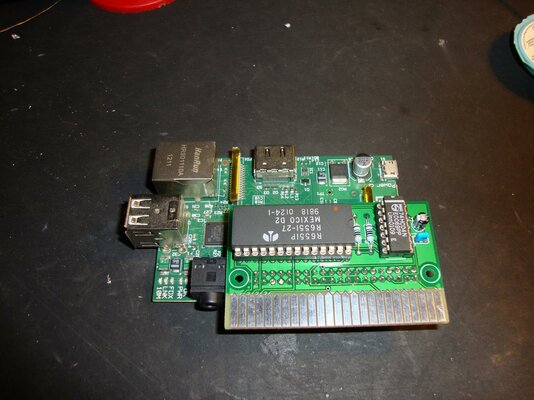
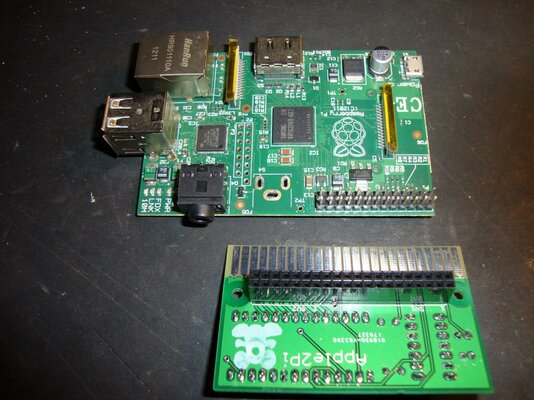
Advise you chop down the pins on P2 or remove the complete header as movement of the Pi1 will cause a short circuit between P2 and the Interface board.

See the Piccys.... Right Linux Time :)
 

Attachments

  • DSC01808.jpg
    DSC01808.jpg
    198.7 KB · Views: 3
  • DSC01809.jpg
    DSC01809.jpg
    192.6 KB · Views: 3
so if I put this in slot 7 the pi is on the LEFT side of the board, ie nearer slot 6, yes?

as ive just taken the comp socket off, and it wont fit anyway as Ive a disk controller card in slot 6. and another disk controller in slot 5.

I think a bit of ribbon cable will get round this. .. [edit] but for now I'll take out one of the cards, get the a2 pi going.

rsvp?
If I ever got the card in the right place?

also ive downloaded an image, I was about to build it but knew somewhere Charlie mentioned an image /1.6 build. so I'll try that tonight or tmo am.
 
Last edited:
The Pi is on the left yes.

You need a controller in slot 6 as the a2pi client expects it. I recomend you use Slot 1for now.
I'm using Slot 1, plenty of room all round :)

I'm downloading an image now but it is painfully slow, still a few hours to go i reckon.

:)
 
Ok ta for confirming its orientation.

Yep mine is now in slot 1 and the brain board (that only works in slot 1!) is out. I've got the same image, got to hook up a monitor and get it going.
 
download link for bas. takes a little while, but this build is 800mb or so.

just copy the files onto a fat32 card and it should boot. Then, plus a 20 min wait for it to expand at 1st boot on the pi.

http://ivanx.com/rasppleii/

link half way down.

charlie, is this the same build you are using? I booted the pi into this, logon with pi/apple 2 and presume from here I can run a2server, gsport and so on. correct? One thing so far is I'm using a usb keyboard to the pi, the apple 2 keyboard isnt working - is that dependent on any link to a super serial card or does the magic happen once I run a2 server or similar?

ta :)
 
Glad you're having fun chaps. Yes, maybe I could have made it more obvious which way round the board goes.
To confirm:
1) Plug Pi in to board such that A2Pi edge connector is down and Pi up... It should be obvious with a 40pin GPIO Pi, take a careful look at the markings on the header for a 26pin GPIO Pi... in Iain's case I deliberately omitted the redundant pins for a 26pin Pi - just cut off the redundant end of the connector if using an older Pi and hopefully good to go. (See photos further up thread)
2) Plug combination in to whatever slot you like. With the Apple's keyboard facing you the Pi should be on the left, nearest the PSU, the A2Pi board to the right. It's obvious with a full size Pi, but less so with a Zero. Personally I'd stick the combination in slot 1 or 7 to allow fullest room for connections but it should fit in any slot as long as any card in the lower slot is not too bulky.
3) Raspapple II for the Pi... important to do the updates, I'll hopefully produce a fuller distribution myself shortly.
4) Boot image to floppy (ADTPro) is quite well hidden inside the Raspapple distro, I just Googled and downloaded off the net (1.6 is the current version, I think)
5) Boot Apple II with disk in drive and everything else set up, you will be asked which slot the A2Pi board is in, shortly after the Apple II will beep and report communication made (also virtual floppy drives ready) Should you change slots press a key to get the Apple II command line and type RUN CONFIG... that will allow you to change things.
6) Change output to the Pi and login as per Raspapple... at least until I sort out 'my' version. Have fun!

There's one he'll of a lot you can do with this - a thorough re-read of the manual is a good idea. Essentially you can boot direct to full-screen Apple IIgs mode or to Linux to access the rest of the options.
Do note the IIgs emulation for full screen and Linux desktop uses separate configurations. Configuring both is accessed by F4 (command+shift+4 on the Apple keyboard, I think)
All Apple II devices should be available to the Pi and it's emulators, equally all Pi resources should be available to the Apple II in one way or the other...
...I've yet to try this lot in my real IIgs. I've taken a few days holiday but do have Internet access.
 
Last edited:
PS
Iain: Sorry, I just spotted your post.
Yes, that's the the version of Raspapple II I'm using. Once up and running it's best to do a full update for more speed / functionality. Instructions on web site.
I have made some changes (improvements?) which I'll hopefully share once I work out how to shrink a Rasbian install... Stupidly I installed on to a 32gb card which isn't helpful for sharing.
The driver disc needs to be in a floppy drive when you power up. I think the latest version is 1.6 and is contained within the Raspapple II distro once you've updated... having said that it's t bl**dy well hidden! Googling will turn up a copy on GITHUB if I remember correctly. (Image to floppy with ADTPro)
Floppy drive will grind... Ask which slot the A2Pi is in then initialise the link. The Apple II will beep when the link is made and report the availability of virtual floppy drives. If you change slots typing RUN CONFIG at the apple's command line will allow you to change this.
Switch to the Pi's video output and login:
Either direct to full screen IIgs mode or to the Linux command line depending on which login options you use. If the latter typing startx will bring you to the Linux desktop.
If all went to plan (post beep) the Pi will take over all the Apple II's resources (inc keyboard) for it's own use, and for integration with the emulators... Unless you want to use it the other way round! (See included manual for more info)

I hope that helps,
Charles.

PS
The board is a bit of a tight fit if there's a card in a slot lower than it... I got round that by using slot 1. If that's not possible there's a few options:
-Jam the b*gger in your preferred slot, possibly with a bit of card to prevent shorts. Eek!
-Rearrange cards so the one to the left of the A2Pi board is a thin one. Not always possible.
-Solder the Pi directly to the A2Pi, having dispensed with the socket, will make the installation thinner, especially if using a Pi Zero.
-Ribbon cable between A2Pi and Pi... It's basically a serial connection so there shouldn't be any great concerns about increasing the bus length.
-Solder the Pi to the other side of the A2Pi... Tricky, but if put in slot 7 there will be as much room as you need.
 
Last edited:
hi charlie

so its working, bas pointed me at the a2pi floppy image which I'd not found/lost. it now works

i made a disk of that from adtpro over superserial, and "run config" to force it to look to slot 0.

boots fine into 80 columns too and i can login to the pi from the a2 keyboard. yay!

ive not worked out how to use the pi as virtual drive etc or adtpro server.

i'll update it as you say.

how do you enter ssid and wifi password on raspbian/ raspple, any idea? then I'll update it.

Longer term I have to get it into slot 7, so i'll be asking nicely if i can buy another -perhaps you have someone i can send this one to? i need to get the pi onto the other side into the free space, or onto a ribbon, neither seem possible with a disk 2 controller card in slot 6, theres just not enough space. maybe with a 90 degree upwards pin header id' be able to make it fit.

awesome so far!
 
do you have any boards left ?

Hello,
I do indeed. Would you like one? PM me, there's a few options.

All the best,
Charles.

- - - Updated - - -

hi charlie

so its working, bas pointed me at the a2pi floppy image which I'd not found/lost. it now works

i made a disk of that from adtpro over superserial, and "run config" to force it to look to slot 0.

boots fine into 80 columns too and i can login to the pi from the a2 keyboard. yay!

ive not worked out how to use the pi as virtual drive etc or adtpro server.

i'll update it as you say.

how do you enter ssid and wifi password on raspbian/ raspple, any idea? then I'll update it.

Longer term I have to get it into slot 7, so i'll be asking nicely if i can buy another -perhaps you have someone i can send this one to? i need to get the pi onto the other side into the free space, or onto a ribbon, neither seem possible with a disk 2 controller card in slot 6, theres just not enough space. maybe with a 90 degree upwards pin header id' be able to make it fit.

awesome so far!
Glad you've got it working. Feel free to PM me about options. The simplest thing would be a ribbon cable for what you have but there's other options.

All the best,
Charles
 
:-)
Composite out will make for a more 'authentic' output than HDMI. The article you posted certainly has a neat solution. If I might suggest cutting the end off a suitable cable and soldering directly to the Pi will save more space.

Um, if the Apple is connected by composite and so is the Pi..?
 
Back
Top Bottom